

5 Essential Work-in-Process Management Solutions for Real-Time Production Control
Improve production visibility with precision work-in-process tracking, automation, mobile data capture, traceability, and real-time shop-floor control.
BellHawk helps manufacturers, food processors, defense suppliers, pharmaceutical operations, and regulated teams replace manual tracking with real-time work-in-process management across raw materials, components, containers, work orders, labor, and finished goods.
- WIP Tracking
- LPN Container Tracking
- Barcode & RFID
- ERP Integration
See jobs, materials, containers, and production status before delays turn into problems
Work-in-process tracking gives your team a view of what is being made, where materials are located, which jobs are moving, and which exceptions need attention. Instead of waiting for spreadsheet updates or delayed ERP transactions, managers can see work-in-process activity as it happens.
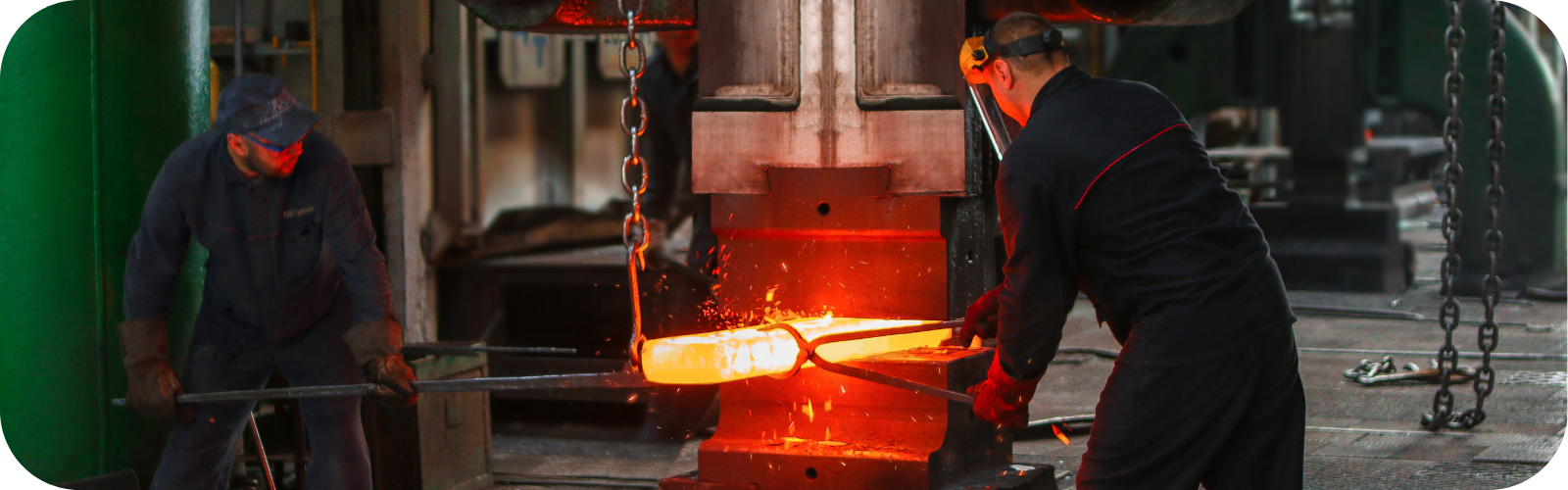
- WIP status as work happens
- Material movement recorded
- Audit trail connected
Replace spreadsheet chaos with real-time work-in-process visibility
Work-in-process management gives operations teams the ability to see where materials, jobs, containers, labor, and production activity stand at any moment. BellHawk helps businesses reduce manual entry, prevent missing inventory, improve order fulfillment, and keep production records accurate from receiving through shipment.
Track every container
Use license plate number (LPN) tracking, nested containers, barcode scans, and RFID reads to monitor raw materials, WIP, components, and finished goods across sites.
Capture activity as it happens
Workers can update inventory, labor, material usage, work order status, and production movement from the shop floor using BellHawk's browser-based platform.
Connect production data
MilramX helps connect BellHawk with ERP platforms, QuickBooks Enterprise, databases, label printers, scales, barcode scanners, RFID portals, and other systems.
Work-in-process management connects materials, jobs, labor, and inventory in real time
When materials are moving through production, teams need more than spreadsheets and delayed ERP updates. BellHawk work-in-process tracking software helps managers see what is in process, where it is located, what materials were used, and which jobs need attention.
For production teams
See which jobs are active, delayed, waiting on materials, or ready for the next step.
For inventory teams
Connect raw materials, components, containers, WIP inventory, and finished goods into one record.
For regulated teams
Support audit trails, lot history, serialized tracking, and recall-ready traceability records. KnarrTek software supports documentation and does not certify compliance; compliance responsibility remains with the customer.
5 essential work-in-process management solutions
These five capabilities give teams the visibility, accuracy, mobility, compliance support, and production control needed to manage work-in-process in complex operational environments.
Real-time visibility
LPN tracking monitors materials, containers, work orders, and WIP status across locations and production stages.
Error reduction
Automation reduces manual entry mistakes, missed transactions, inventory discrepancies, and production delays.
Mobile efficiency
Workers can update inventory, labor, job status, material movement, and WIP activity directly from the floor.
Compliance support
Traceability and audit trails help support documentation for FDA, food safety, pharmaceutical, and 21 CFR Part 11 requirements. Compliance responsibility remains with the customer.
Production monitoring
Real-time WIP status helps managers identify bottlenecks, optimize schedules, prevent shortages, and respond before delays grow.
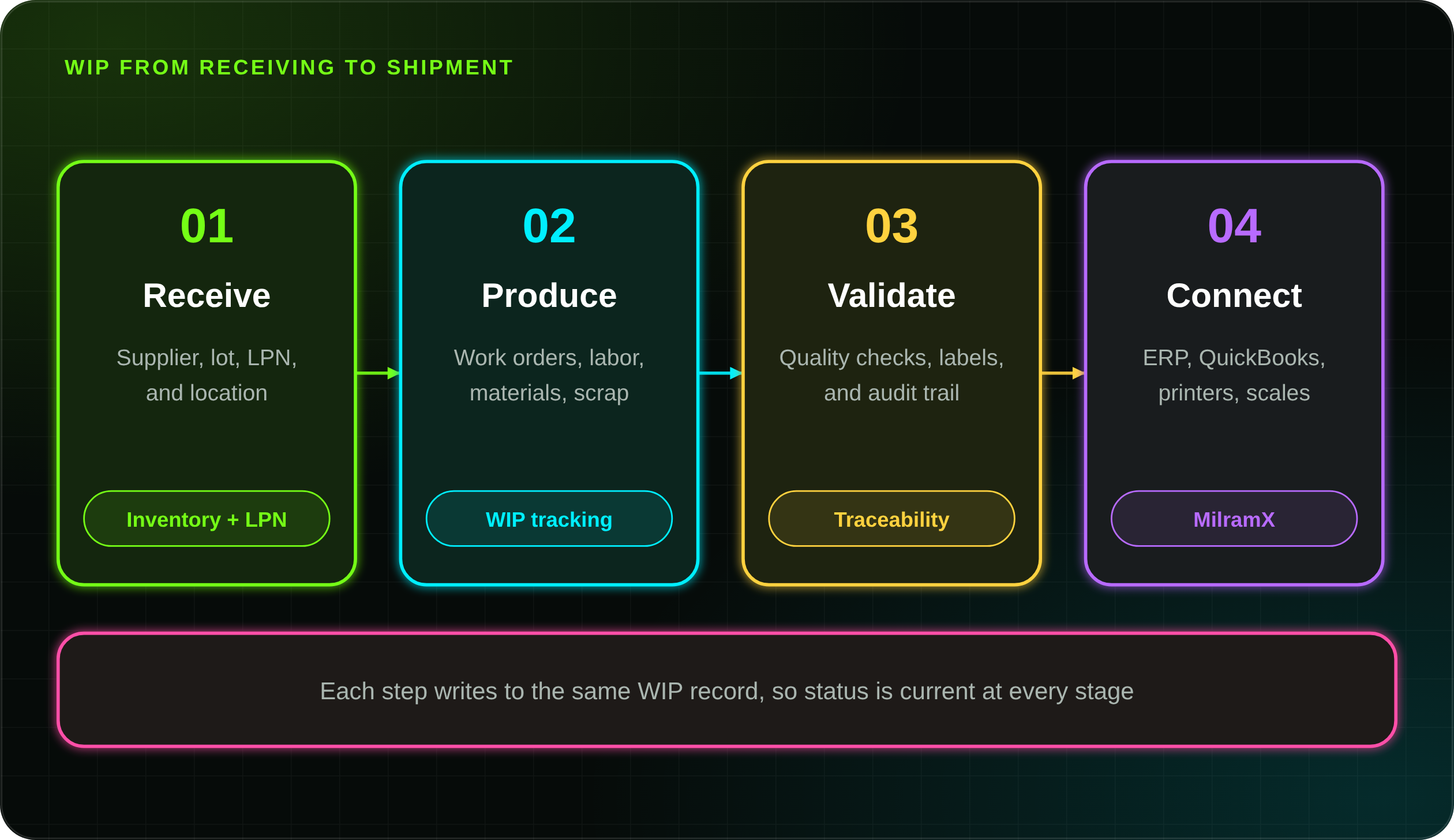
Control work-in-process management from receiving to production to shipment
BellHawk provides the operational data capture layer needed to track inventory and WIP in real time. MilramX adds intelligent alerts and system integration so managers can respond faster to low stock, delayed jobs, missing materials, equipment issues, and production bottlenecks.
Capture raw materials and containers
Record supplier, lot, serial, quantity, location, LPN, container, and receiving data so materials enter production with clean traceability from the start.
Track work orders, labor, and material usage
Capture WIP stages, labor entries, component consumption, scrap, rework, and job status updates while work is happening instead of after the fact.
Support quality, compliance, and audit history
Connect production activity with traceability records, quality checks, label validation, and audit trails for regulated operations.
Sync data with business systems
Connect operational activity with ERP, QuickBooks Enterprise, label printers, scales, databases, mobile devices, barcode scanners, and RFID portals.
Work-in-process tracking software turns production activity into usable operational data
Traditional production tracking often depends on paper travelers, spreadsheet logs, handwritten notes, and after-the-fact ERP updates. These tools may record what happened eventually, but they rarely show what is happening right now. BellHawk work-in-process tracking software captures activity at the point where work happens: barcode scans, RFID reads, mobile entries, and connected devices record receiving, putaway, issuing, production, inspection, packing, and shipping.
Before real-time WIP tracking
Teams rely on manual updates, delayed entries, tribal knowledge, paper notes, and disconnected spreadsheets.
After work-in-process management
Teams can see current job status, material movement, inventory usage, bottlenecks, and production exceptions.
With connected WIP data
Managers can make better decisions using real-time production tracking, traceability records, and integrated system updates.
Related capabilities: job tracking software, barcode tracking, RFID tracking, and traceability software.
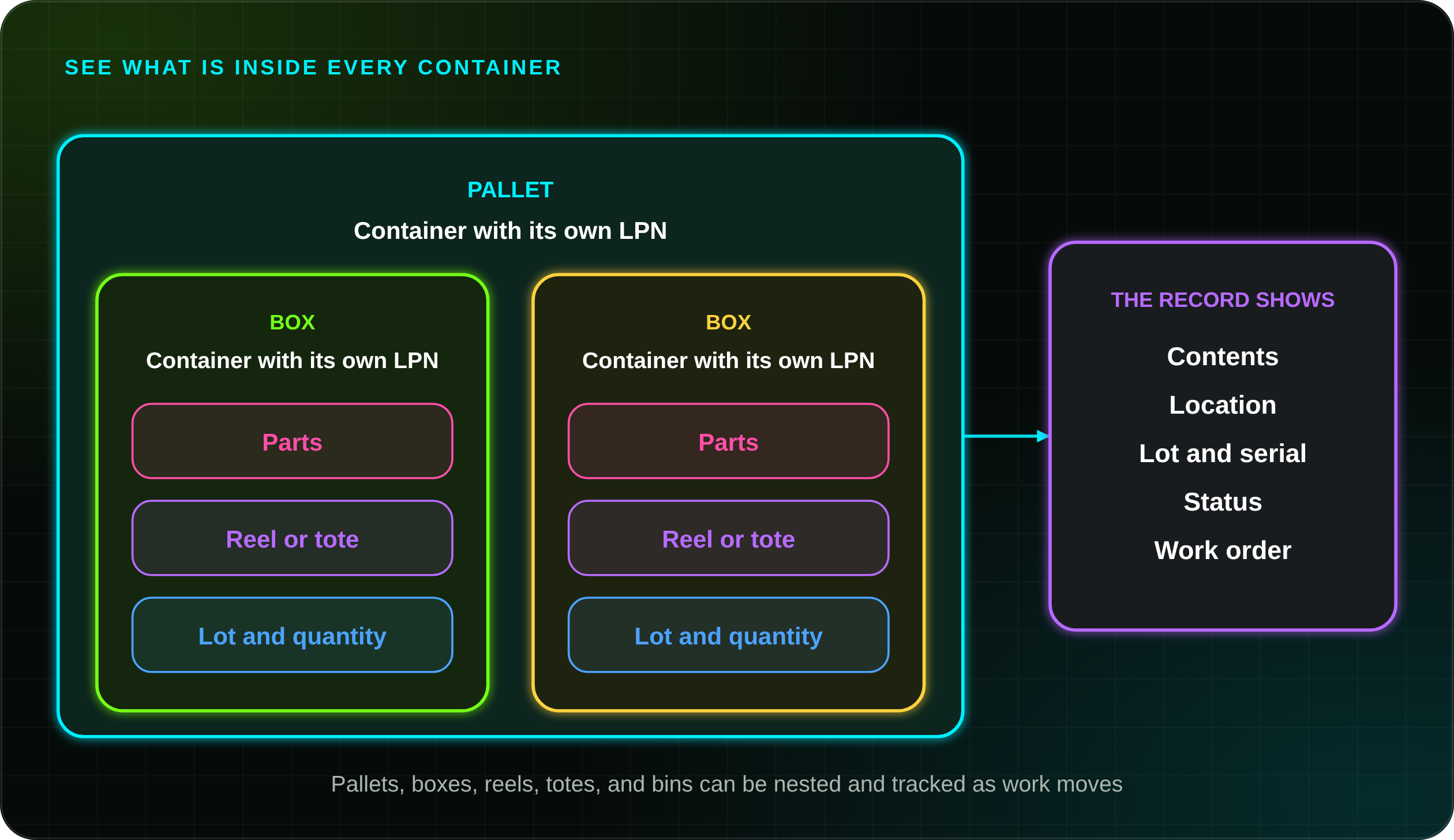
Nested container tracking for work-in-process management
Nested container tracking helps teams see what is inside pallets, boxes, reels, totes, bins, and other WIP containers, so a question about a part starts with the container record instead of a search.
Alerts and system integration for work-in-process management
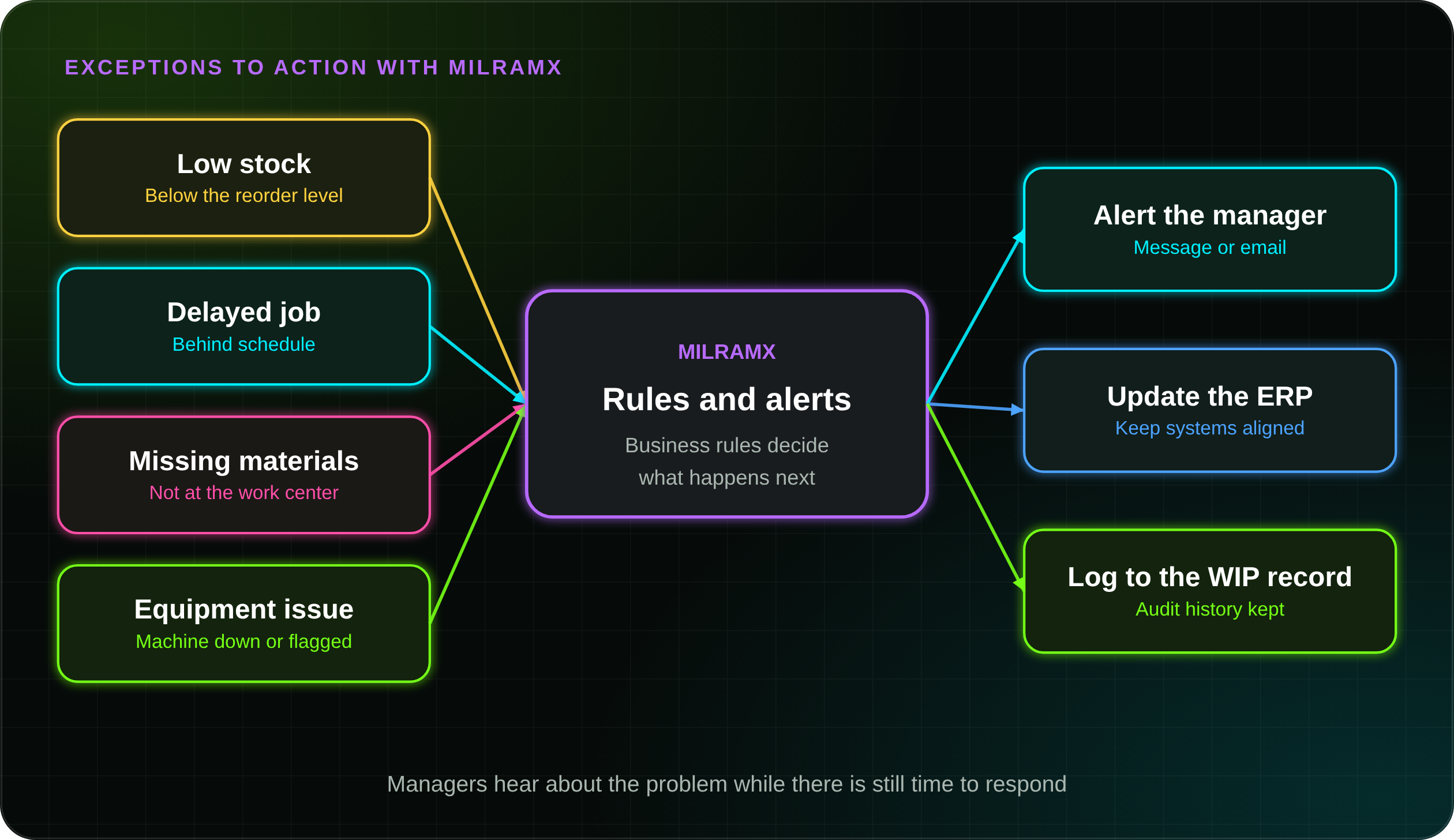
MilramX is a rules-based integration and decision-support platform. For work in process, it watches for the exceptions that slow production, then alerts the right person, updates the ERP, and logs the event to the WIP record. See MilramX for the platform behind these alerts.
Low stock
Flag materials that fall below the level you set before a job runs short.
Delayed jobs
See which jobs are behind so schedules can change while there is time.
Missing materials
Catch parts that are not at the work center when a job needs them.
Equipment issues
Raise machine problems and bottlenecks to the people who can respond.
Work-in-process management for manufacturing, food, defense, and pharmaceutical teams
BellHawk is designed for environments where precision matters. Whether your team needs better production visibility, tighter component control, improved recall readiness, or cleaner records, real-time WIP management helps prevent delays and reduce risk.
Manufacturing
Track jobs, components, labor, machines, materials, scrap, rework, and production stages.
Real-time manufacturing FoodFood processing
Monitor perishable materials, lots, containers, production usage, and food safety traceability.
Food traceability DefenseDefense
Maintain strict material control, component visibility, serialized records, and audit history.
Defense traceability PharmaPharmaceuticals
Support regulated tracking, audit trails, lot history, and 21 CFR Part 11 documentation workflows.
Pharmaceutical solutionsMore industries are covered in traceability software by industry.
What better work-in-process management can improve
BellHawk and MilramX help managers make faster, more accurate decisions by connecting real-time production, inventory, traceability, and system data.
Reduce labor and inventory costs
Automated tracking can reduce time spent on manual counts, duplicate entry, inventory research, and production follow-up.
Find problems earlier
Real-time job tracking helps managers identify delays, shortages, quality holds, and production slowdowns before they escalate.
Strengthen audit trails
Traceability records document material movement, WIP stages, quality events, and inventory transactions for regulated operations.
Track nested containers
Nested container tracking helps teams see what is inside pallets, boxes, reels, totes, bins, and other WIP containers.
Improve accuracy and satisfaction
Real-time tracking helps reduce picking errors, missed materials, wrong shipments, and customer order issues.
Connect ERP and QuickBooks
Operational activity can be shared with ERP systems, QuickBooks Enterprise, databases, printers, scales, and other tools.
Three ways to run work-in-process management software
BellHawk and MilramX sit underneath KnarrTek's product line, delivered as three packaged options. Compare them on the package comparison page.
BellHawk Online
Browser-based real-time tracking for inventory, labor, and job status, without replacing your ERP. Best for smaller operations that want cloud tracking.
Explore BellHawk Online On-PremiseWIPtracker
In-facility MES and WMS control with WIP tracking, barcode and RFID capture, and traceability. Best for operations that need full shop-floor control.
Explore WIPtracker Rules & AlertsSmartOps24x7
ERP integration and operations monitoring built on MilramX agents, with rules-based alerts and automated data exchange.
Explore SmartOps24x7Learn more with WIP-focused KnarrTek white papers
Practical guides by Dr. Peter Green on barcode and RFID WIP tracking, labor tracking, manufacturing mistakes, material traceability, and inventory error prevention.
Barcodes vs RFID for Work-in-Process Tracking
Compare barcode and RFID methods for tracking work-in-process activity across manufacturing operations.
Open PDF Labor TrackingHow Much of Their Time Are Your People Actually Working?
How labor tracking can reveal job status, operation time, elapsed time, and late-order warnings.
Open PDF Error PreventionHow to Prevent 9 Costly Mistakes in Manufacturing and Distribution
Common operational mistakes and how automated data collection can help prevent them.
Open PDF TraceabilityInventory Tracking vs. Materials Traceability
The difference between knowing what inventory exists and knowing where materials came from and were used.
Open PDF Inventory AccuracyPreventing Inventory Errors
How better tracking can reduce manual mistakes, missing inventory, wrong counts, and delayed updates.
Open PDF Material TrackingTracking Sheets, Rolls, and Lengths of Material
How to track variable-length materials, sheets, rolls, remnants, and usage through production.
Open PDFTurn WIP visibility into real-time production control.
Whether you are battling inefficiencies, struggling with records, or tired of spreadsheet chaos, our team is ready to show you a WIP management solution tailored to your operation. Call 774-415-7878 or email Sales@KnarrTek.com and you will get quick, friendly answers from people who know the software. KnarrTek works from offices in Millbury, Massachusetts and Panama City, Florida, and operates globally, with current accounts in Mexico and Canada.
- Real-time WIP tracking
- Barcode and RFID capture
- ERP and QuickBooks integration
- Audit trails
Work-in-process management FAQs for manufacturers, processors, and regulated operations
These answers help operations teams compare work-in-process software, WIP tracking software, inventory traceability, barcode scanning, RFID tracking, ERP integration, and real-time production control. See also the industrial tracking software FAQs.
What is work-in-process management?
Work-in-process management is the process of tracking materials, jobs, labor, containers, production activity, and inventory while work is still in progress. BellHawk work-in-process management software helps teams see what is being made, where materials are located, what has been used, and which jobs need attention.
Why is work-in-process tracking important for manufacturers?
Many production problems happen between receiving and shipping. Real-time work-in-process tracking helps manufacturers reduce missing materials, late job updates, inaccurate inventory counts, unclear job status, and production delays.
How does BellHawk improve work-in-process visibility?
BellHawk captures barcode scans, RFID reads, labor entries, material movement, container activity, job status, and traceability records as work happens. This gives managers a real-time view of production activity instead of relying on delayed spreadsheets or manual logs.
Can BellHawk connect work-in-process tracking with ERP systems?
Yes. BellHawk and MilramX can support data exchange with ERP systems, QuickBooks Enterprise, accounting systems, label printers, scanners, scales, databases, and shop-floor devices. ERP integration helps keep WIP activity aligned with production, inventory, purchasing, accounting, and customer order data.
Does work-in-process tracking help with compliance and traceability?
Work-in-process tracking can help regulated operations maintain audit trails, lot history, serialized records, quality events, material movement records, and production documentation. This is valuable for food processing, pharmaceuticals, medical devices, defense manufacturing, and other compliance-driven industries. KnarrTek software supports documentation and does not certify compliance, and compliance responsibility remains with the customer.
What industries use work-in-process management software?
Work-in-process management software is used by manufacturers, food processors, pharmaceutical companies, defense suppliers, medical device companies, chemical processors, packaging operations, industrial distributors, and other teams that need real-time production and material visibility.
Can BellHawk support barcode and RFID WIP tracking?
Yes. BellHawk can support barcode scanning and RFID tracking for work orders, materials, containers, assets, inventory locations, labor activity, production stages, and shipping transactions. Barcode and RFID tracking help reduce manual entry and improve work-in-process accuracy.
How does work-in-process management reduce inventory errors?
Work-in-process management reduces inventory errors by recording material movement, consumption, transfers, scrap, rework, and production updates as they happen. This helps prevent missing materials, incorrect counts, duplicate entries, and disconnected production records.
Is BellHawk useful for multi-site manufacturing operations?
Yes. BellHawk can support work-in-process visibility across multiple buildings, plants, warehouses, freezers, production areas, and remote locations. Multi-site WIP tracking helps teams coordinate inventory movement, job status, production activity, and traceability across locations.
Where does KnarrTek provide work-in-process software support?
KnarrTek works from offices in Millbury, Massachusetts and Panama City, Florida, and operates globally, with current accounts in Mexico and Canada. BellHawk can support cloud, on-premise, and connected operational environments, and the team supports work-in-process projects for manufacturers, processors, distributors, and regulated operations.
How does WIP tracking improve production scheduling?
WIP tracking shows which jobs are active, which jobs are delayed, which materials are missing, and where bottlenecks are forming. Real-time production data helps managers adjust schedules before delays become customer service or fulfillment problems.
What makes BellHawk different from spreadsheet-based WIP tracking?
Spreadsheet-based WIP tracking depends on manual updates and after-the-fact data entry. BellHawk captures production activity with barcode scanning, RFID, mobile updates, container tracking, labor entries, traceability records, and ERP-connected workflows, giving teams more reliable real-time operational control.
What is LPN tracking in work-in-process management?
LPN stands for license plate number. Each container, such as a pallet, box, reel, or tote, gets its own unique label, and scanning it shows what is inside, where it is, and what work order it belongs to. LPN tracking lets teams follow containers through production without re-entering what is in them.
What is nested container tracking?
Nested container tracking records containers inside other containers, such as boxes on a pallet or parts in a tote. When the outer container moves, the system knows what moved with it, which helps teams see what is inside every pallet, box, reel, tote, and bin.
How does BellHawk track labor in work-in-process management?
Workers enter labor against jobs and operations from the shop floor, which gives managers job status, operation time, and elapsed time. KnarrTek's labor tracking white paper explains how this can support late-order warnings.
Can MilramX send alerts about WIP problems?
Yes. MilramX is rules-based, so alerts are configured around your business rules. Typical examples are low stock, delayed jobs, missing materials, equipment issues, and production bottlenecks. The alert can go to the right person, update the ERP, and log to the WIP record.
Does BellHawk work with QuickBooks Enterprise?
Yes. MilramX can connect BellHawk with QuickBooks Enterprise so that production and inventory activity captured on the floor can be shared with the accounting system, depending on the project scope.
Can work-in-process tracking handle scrap and rework?
Yes. Scrap, rework, and component consumption can be recorded against the job as they happen, so managers can see how much material a job actually used and where waste occurred.
How is BellHawk different from WIPtracker?
BellHawk is the data capture platform that sits under KnarrTek's products. BellHawk Online is the cloud package, and WIPtracker is the on-premise MES and WMS package that includes every BellHawk feature with WIP and shop-floor control. SmartOps24x7 adds rules, alerts, and integrations built on MilramX.
Do I need to replace my ERP to use work-in-process management software?
No. BellHawk and MilramX work alongside your existing ERP, accounting, or business management system. The software captures activity at the point of work, and integration moves that data to the business system.
Does work-in-process management help with recalls?
It can. When materials, lots, containers, and work orders are linked in one record, teams can trace which materials went into which jobs and where finished goods went. That helps keep a recall narrow. Recall procedures and compliance remain the responsibility of the customer.
What does work-in-process management software cost?
Pricing depends on the package. BellHawk Online starts at $450 per month and WIPtracker starts at $900 per month, based on annual prepayment, and SmartOps24x7 is quoted by scope. Contact KnarrTek for a quote that matches your operation.
What hardware do I need?
BellHawk works with barcode scanners, mobile devices, label printers, scales, and RFID readers or portals. The specific devices are chosen with you based on your environment, and the cloud version runs in a browser.
How long does it take to start tracking work-in-process?
It depends on scope, the number of sites, and the systems to be integrated. Many customers begin with one area, such as receiving or a single production line, and expand from there. Contact KnarrTek to discuss your operation and get a realistic plan.
How do I get started with KnarrTek?
Call 774-415-7878 or email Sales@KnarrTek.com, or use the Request a Demo button on this page. You will get quick, friendly answers from people who know the software.
