
Barcode tracking software for real-time inventory, WIP, materials, and container visibility.
KnarrTek helps manufacturers, distributors, warehouses, and regulated operations use barcode identifiers to connect physical materials with accurate digital records.
A barcode is not just a printed label on a box. In a modern barcode tracking system, the barcode acts as an identifier. When a worker scans that barcode, BellHawk uses the identifier to look up, validate, and update the data behind that item, container, pallet, asset, work order, lot, serial number, shipment, location, or production step.
The barcode does not need to hold every detail by itself. It can simply point BellHawk to the right record so the correct data can be displayed, updated, and shared in real time. This helps teams reduce manual data entry, avoid duplicate records, prevent wrong moves, and keep inventory, WIP, production, quality, and shipping data aligned.
KnarrTek’s BellHawk and MilramX platforms help companies replace paper forms, handwritten logs, disconnected spreadsheets, delayed ERP updates, and manual inventory searches with real-time barcode tracking. Teams can scan incoming materials, label containers, issue components to jobs, track work-in-process, verify picks, manage nested containers, create LPN labels, capture quality checks, and send validated updates to ERP, accounting, customer, supplier, and reporting systems.
Identifier scanned. Record updated.
Barcodes identify the object. BellHawk tracks the data behind it.
A barcode does not need to store every detail on the label. It can act as the identifier that tells BellHawk which item, lot, serial number, container, pallet, asset, work order, location, or shipment record to open and update.
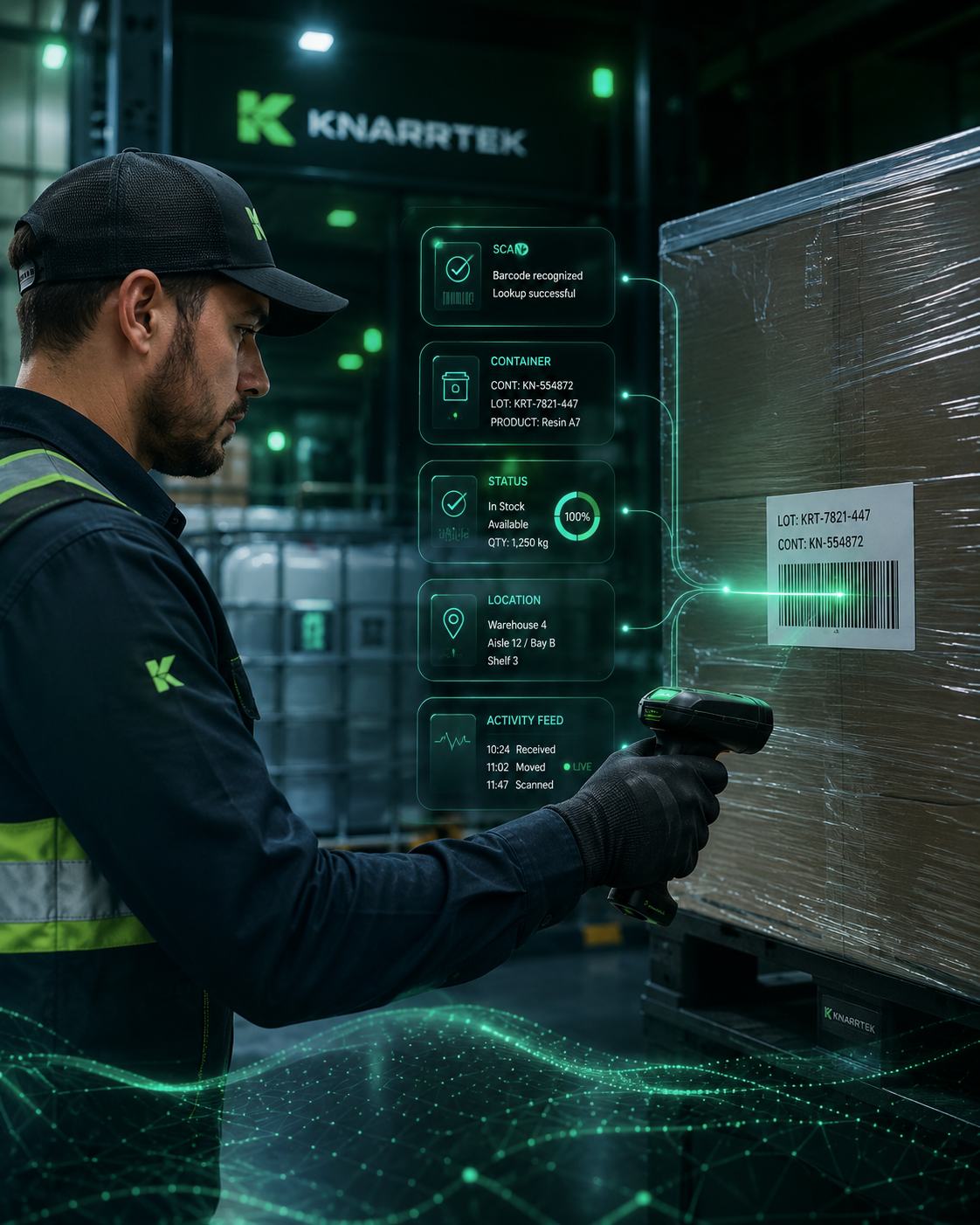
A worker scans a barcode on an item, container, pallet, location, work order, asset, or label.
The identifier tells BellHawk which digital record should be opened, validated, or updated.
The system records receiving, movement, usage, counting, inspection, packing, or shipment activity.
MilramX can help exchange validated updates with ERP, accounting, reporting, supplier, or customer systems.
The barcode identifies the physical object.
The barcode may represent an item number, lot number, serial number, container ID, license plate number, pallet ID, work order, tool, asset, employee, shipment, location, or customer order. When that identifier is scanned, BellHawk uses it to find the correct digital record and update the activity tied to that record.
The database holds the operational details.
A printed label may show a part number or quantity, but the barcode connects the physical item to a live record. That record can include receiving history, supplier information, customer ownership, lot attributes, expiration dates, quality status, inventory quantity, current location, production usage, job history, shipment status, and audit details.
The scan helps prevent wrong moves.
Barcode identifiers reduce confusion when materials look similar. Two pallets may hold the same item but belong to different lots or customer orders. Two containers may sit in the same staging area but need to be issued to different jobs. A scan can validate that the right object is being moved, consumed, picked, packed, counted, returned, inspected, or shipped.
Use barcode scans to capture operational activity as work happens.
Barcode tracking works best when scanning is built into the natural flow of receiving, warehouse movement, production, quality, shipping, and inventory control. BellHawk helps teams capture small operational events that create a reliable digital history.
Scan materials when they enter the operation.
Receiving scans help inventory become visible faster. Teams can capture supplier, purchase order, item number, quantity, lot, serial number, expiration date, customer-owned material, receiving dock, container ID, and initial quality status before material disappears into storage.
Scan moves into bins, racks, pallets, totes, or warehouse zones.
Barcode location scans help teams know where materials are stored. A worker can scan a container and a location to update putaway, transfer, staging, quarantine, freezer storage, production issue, or return-to-stock activity.
Scan materials, jobs, labor, and WIP movement.
In production, barcode tracking connects inventory usage with work orders. Operators can scan components, jobs, work centers, employees, tools, machines, operations, scrap, rework, and finished output so managers can see WIP status in real time.
Use barcode scans to reduce picking and shipping errors.
Scanning helps verify that the right item, lot, serial number, container, quantity, order, and shipment are selected. This can reduce wrong picks, missed materials, incorrect labels, shipping mistakes, and customer service issues.
Improve cycle counts and inventory adjustments.
Barcode scanning can make cycle counting faster and more accurate by connecting counts to the correct item, container, location, and lot. Instead of counting from paper lists, teams can scan physical inventory and capture results directly in BellHawk.
Turn scan events into searchable operational data.
Each barcode scan can become part of a larger operational record. Managers can review inventory movement, job history, shipment activity, quality checks, container relationships, user activity, and audit trails.
Barcode tracking capabilities for inventory, WIP, materials, jobs, assets, containers, and shipments.
KnarrTek helps companies use barcode identifiers across the full operation. The goal is to reduce manual entry, improve inventory accuracy, build a better material history, and give teams faster access to reliable data.
Track stock by item, lot, container, quantity, and location.
Barcode inventory tracking helps teams see what is available, where it is located, what container holds it, and whether it is available, staged, quarantined, consumed, packed, or shipped.
Identify tools, equipment, fixtures, devices, and reusable assets.
Barcode labels can be used to track assets across locations, jobs, departments, maintenance events, calibration activity, and check-in or check-out workflows.
Connect jobs, materials, operators, and production steps.
BellHawk can use barcode scans to track WIP movement, material issue, operation completion, job status, scrap, rework, production output, and labor activity.
Print barcode labels when materials are received, converted, packed, or shipped.
Teams can label raw materials, containers, pallets, WIP, finished goods, shipments, customer-owned materials, lot-controlled items, and serialized components.
Build a searchable history from receiving through shipping.
Barcode tracking can support lot traceability, serial traceability, material genealogy, customer order history, quality records, shipment history, and audit readiness.
Capture activity from the warehouse, shop floor, receiving dock, or field.
Barcode scanning can be used with handheld devices, tablets, shared stations, wearable scanners, label printers, and other operational devices that fit the workflow.
Track containers inside containers without losing visibility.
BellHawk helps teams track parent and child container relationships so pallets, cases, boxes, totes, bags, reels, cartons, and serialized parts stay connected in one real-time record.
Lot 24A
Lot 24B
Lot 24C
One scan can move the full container structure.
When a parent pallet or container moves, BellHawk can understand that the child containers and materials inside it moved with it.
Child containers can still be tracked individually.
If a case, tote, box, or bag is removed, split, consumed, returned, or shipped separately, the relationship can be updated.
Material history stays easier to search.
Teams can see what was inside a pallet, where it moved, which lot it belonged to, and how it was used in production or shipment.
Nested tracking reduces confusion when materials are packed together.
A pallet may hold cases, each case may hold boxes, and each box may hold bags, serialized parts, or customer-owned materials. Without nested container tracking, workers may only know the top-level pallet or shipment. That creates risk when the operation needs to know exactly which lot, serial number, material, order, or job is inside.
Parent-child relationships follow real material movement.
BellHawk can maintain the relationship between parent containers and child containers. A forklift driver may scan a pallet, a picker may scan a carton, a production operator may scan a tote, and a quality technician may scan a lot label. BellHawk connects these scan events so the digital record mirrors how materials are actually handled.
Use nested container tracking across warehouse, production, and shipping workflows.
Nested barcode tracking is useful for manufacturing, industrial distribution, food production, medical supplies, aerospace, defense, chemicals, packaging, textiles, cold storage, and construction materials. It is especially helpful when materials are staged for production, packed for shipment, loaded onto trucks, moved between sites, or stored in controlled areas.
Use License Plate Number tracking to identify pallets, totes, bins, cartons, containers, and shipments.
LPN tracking stands for License Plate Number tracking. In warehouse and manufacturing operations, an LPN is a unique identifier assigned to a handling unit such as a pallet, tote, bin, carton, container, case, roll, reel, bundle, or shipment. The LPN works like a license plate on a vehicle. The number identifies the container, and BellHawk stores the data behind it.
One scan can represent everything inside the container.
When a container receives an LPN barcode, workers can scan the LPN instead of scanning every individual item each time the container moves. BellHawk can store the contents, quantities, lots, serial numbers, customer order, current location, quality status, and movement history behind that LPN.
LPN tracking is especially useful when materials are grouped together for handling. A pallet may contain multiple cartons. A tote may contain several jobs. A kit may contain many components. A shipping container may include mixed items, serial numbers, or lot-controlled materials. The LPN gives the handling unit a single identity while BellHawk maintains the data behind it.
Create or scan LPN labels when materials arrive so inbound containers become visible immediately.
Use LPNs to stage material kits, move WIP, track containers between operations, and issue materials to work orders.
Use LPNs to verify packing, shipment contents, truck loading, customer orders, and delivery documentation.
For logistics workflows, container identifiers can align with structured shipping identifiers such as SSCC labels when required.
Barcode tracking software for manufacturers, distributors, processors, warehouses, and regulated operations across the United States.
KnarrTek supports barcode tracking software projects for companies across the United States, including New England, the Southeast, the Midwest, the Mid-Atlantic, and other industrial regions. The same barcode tracking foundation can support small production teams, growing warehouses, multi-site distributors, and complex manufacturing environments.
Track raw materials, WIP, jobs, operators, work centers, components, scrap, rework, finished goods, and production history.
Improve receiving, putaway, replenishment, picking, packing, shipping, LPN tracking, and inventory accuracy.
Use barcode tracking for lots, ingredients, batches, expiration dates, recipes, labels, traceability, and shipment records.
Track components, devices, serial numbers, labels, quality records, inventory movement, and audit history.
Support controlled materials, serialized parts, job records, traceability, inspection activity, and chain-of-custody workflows.
Track drums, totes, batches, lots, labels, containers, usage, quality checks, and regulated material movement.
Use barcode identifiers for pallets, bundles, yard inventory, customer jobs, deliveries, tools, and jobsite material movement.
Track rolls, sheets, labels, cartons, customer orders, WIP, scrap, finished goods, and shipment verification.
Turn barcode scans into validated data for ERP, accounting, reporting, customers, and suppliers.
Barcode tracking is most valuable when scan data is used beyond the handheld device. MilramX helps exchange validated operational data between BellHawk and the business systems your company already uses.
Share receiving, inventory, production, shipment, job, and material movement updates with ERP systems.
Trigger barcode labels for inventory, containers, pallets, WIP, finished goods, customer orders, and shipments.
Capture barcode scanner, RFID reader, scale, workstation, mobile device, and shop-floor data in one workflow.
Notify the right people when a scan shows missing inventory, incorrect material, blocked status, or a failed transaction.
Build barcode tracking around the workflow your team already performs.
A barcode tracking project should not start with labels alone. It should start with the operational questions your team needs to answer. What do we need to identify? What events should be scanned? Which locations matter? Which containers move together? Which records need to update the ERP system?
KnarrTek helps teams think through the physical workflow first. The right barcode design should support the people doing the work. Receiving should be fast. Putaway should be simple. Production issue should be clear. Cycle counts should be reliable. Shipping verification should reduce errors.
Identify what needs a barcode: items, containers, locations, lots, serials, assets, tools, jobs, pallets, or shipments.
Define the scan events: receive, move, count, issue, consume, inspect, pack, ship, return, scrap, or rework.
Map the data behind each scan: item, quantity, status, location, user, time, job, customer, order, or quality result.
Decide where LPN and nested container tracking can reduce repeated scans while preserving traceability.
Connect the validated scan data to ERP, accounting, reporting, label printing, and customer or supplier workflows.
Explore white papers on barcode tracking, RFID, WIP, inventory errors, and materials traceability.
Use these KnarrTek resources to support internal planning, compare barcode and RFID tracking, understand traceability, reduce inventory errors, and improve real-time visibility across materials, WIP, containers, jobs, and shipments.
Open White Paper LibraryBarcodes vs RFID for WIP Tracking
Compare barcode and RFID tracking methods for production, WIP visibility, and material movement.
Open PDF Inventory AccuracyPreventing Inventory Errors
Learn how better scanning, labeling, and tracking can reduce wrong counts and missing materials.
Open PDF TraceabilityInventory Tracking vs. Materials Traceability
Understand how inventory visibility differs from a full material history from receiving to shipment.
Open PDF Inventory ControlTaking Inventory
Explore better ways to count, verify, and control inventory using connected tracking processes.
Open PDFBarcode tracking software FAQs for manufacturing, warehouse, distribution, and regulated operations.
These answers help teams compare barcode tracking software, inventory barcode systems, LPN tracking, nested container tracking, WIP barcode tracking, ERP integration, label printing, lot traceability, and real-time materials visibility.
What is barcode tracking software?
Barcode tracking software uses scannable identifiers to connect physical items, containers, locations, assets, work orders, lots, serial numbers, and shipments to digital records. BellHawk uses barcode scans to capture activity such as receiving, movement, inventory counting, production issue, WIP tracking, quality checks, packing, and shipping.
Do barcodes store all the data?
Not usually. In many tracking systems, the barcode stores or represents an identifier. BellHawk uses that identifier to find the correct record in the database. The database can then store the detailed information behind the barcode, including item data, lot history, location, status, quantity, quality results, job usage, and shipment history.
How does barcode tracking improve inventory accuracy?
Barcode tracking improves inventory accuracy by reducing manual entry, connecting transactions to specific items and containers, and capturing movement in real time. Instead of writing down moves or updating spreadsheets later, workers can scan materials as they receive, store, issue, count, pick, pack, and ship them.
What is LPN tracking?
LPN tracking uses a License Plate Number to identify a handling unit such as a pallet, tote, bin, carton, case, roll, reel, or shipping container. The LPN barcode identifies the container, while BellHawk stores the contents and movement history behind that LPN.
What is nested container tracking?
Nested container tracking allows one container to hold other containers. For example, a pallet can hold cases, cases can hold boxes, and boxes can hold serialized parts. BellHawk helps maintain these parent-child relationships so teams can understand what is inside each container and how those contents move.
Can BellHawk track barcode labels for WIP?
Yes. BellHawk can use barcode labels to track work orders, WIP materials, production steps, employees, work centers, containers, tools, scrap, rework, and finished output. This helps connect material usage with job progress and production history.
Can barcode tracking support lot and serial traceability?
Yes. Barcode tracking can support lot-controlled and serialized materials by connecting scans to lot numbers, serial numbers, receiving records, production usage, quality checks, shipment history, and customer orders.
Can barcode tracking connect with ERP systems?
Yes. MilramX can help exchange validated BellHawk barcode tracking data with ERP, accounting, QuickBooks Enterprise, customer systems, supplier systems, reporting tools, label systems, and other operational platforms.
Ready to connect barcode identifiers with real-time operational data?
BellHawk and MilramX help teams track inventory, materials, WIP, jobs, assets, containers, LPNs, nested containers, labels, lots, serial numbers, quality checks, and shipments with barcode-driven visibility.
