

Industrial Tracking Software FAQs for Inventory, WIP, Barcode, and Traceability
Straight answers about KnarrTek industrial tracking software for manufacturers, warehouses, distributors, processors, and regulated operations: inventory accuracy, barcode and RFID scanning, work-in-process visibility, materials traceability, and ERP-connected shop floor data.
Most teams arrive here because a familiar process has started to slow them down. Counts don't match the floor, work orders are hard to find, paper travelers are updated late, and the ERP is missing what happened today. The answers below are grouped by the problem you're trying to solve.
- 44 Answers
- 8 Topics
- Millbury, MA and Panama City, FL
What Is Industrial Tracking Software?
Industrial tracking software records what happens to materials, containers, jobs, tools, and finished goods as they move through receiving, storage, production, inspection, packing, and shipping. Data is captured by barcode scan, RFID read, or mobile screen at the point of work, so inventory, WIP status, and traceability records stay current and can be shared with ERP.
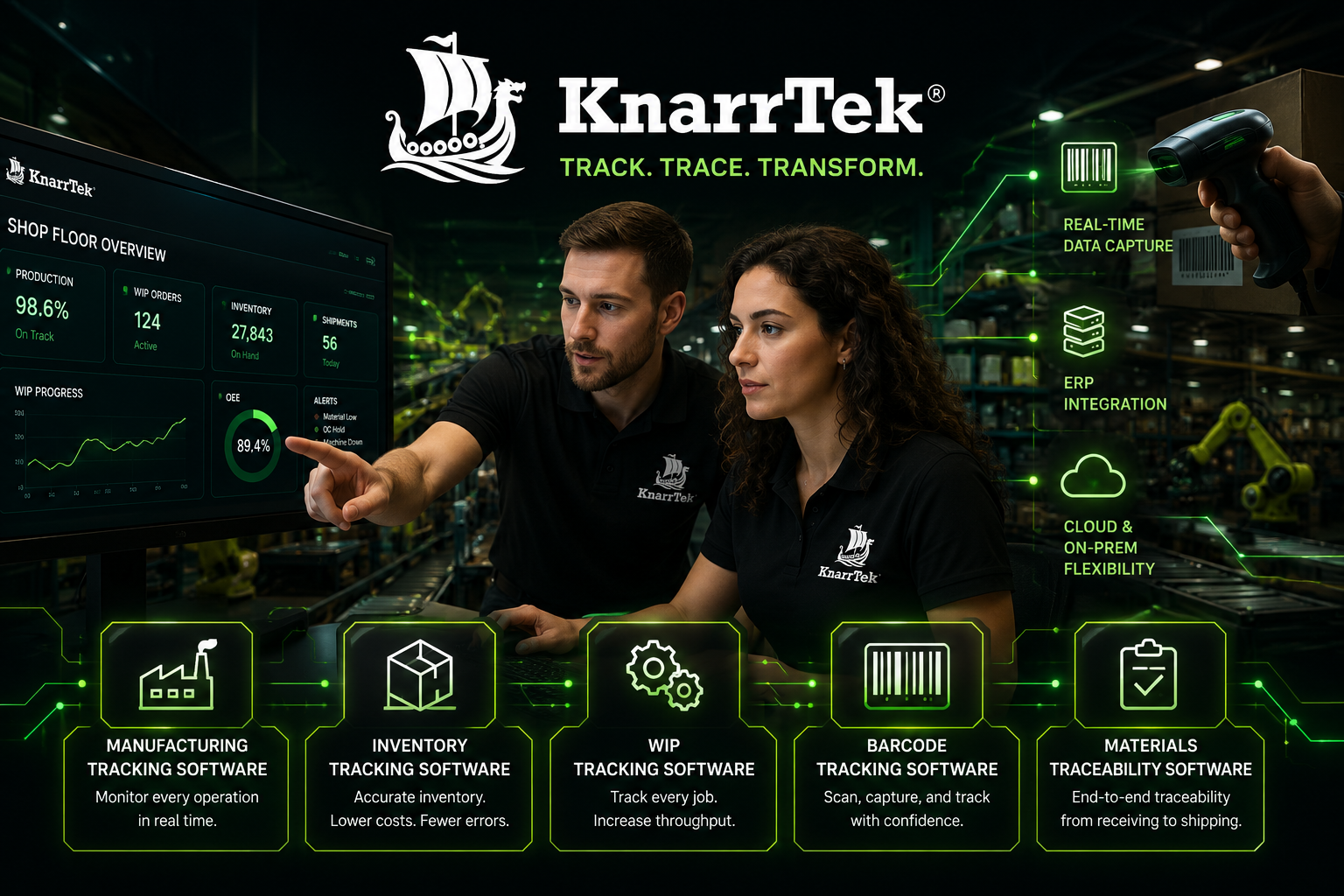
KnarrTek builds its industrial tracking software on two platforms: BellHawk for real-time capture and MilramX for alerts, integration, and decision support.
Inventory is inaccurate
Counts, bin locations, and warehouse moves depend on spreadsheets and late updates.
Inventory FAQs Problem 02WIP is hard to find
Jobs move through many steps and supervisors can't see what is waiting or done.
WIP FAQs Problem 03Traceability takes too long
Lot, serial, label, and shipment history takes days to rebuild from paper.
Traceability FAQs Problem 04ERP data is late
The ERP depends on manual entry from receiving, production, and shipping.
ERP FAQsInventory Tracking Software and Barcode Tracking Software FAQs
Day-to-day tracking problems that cause miscounts, missing material, and wasted time across receiving, stockrooms, the warehouse, and shipping.
- inventory tracking software
- small business
- barcode tracking software
- RFID
- containers and pallets
How does industrial tracking software improve inventory tracking?
Industrial tracking software records material movement where the work happens instead of at the end of a shift. With KnarrTek, receiving, put-away, stockroom moves, staging, issues to production, quality holds, packing, and shipping are captured by barcode scan, RFID read, mobile computer, tablet, or browser screen. That reduces inaccurate counts, duplicate purchases, location confusion, and delays caused by not knowing what is available.
Does KnarrTek offer inventory tracking software for small business?
Yes. KnarrTek provides inventory tracking software for small business, family-owned manufacturers, smaller warehouses, and growing distributors. Many start with Excel because it is familiar, then find it hard to control as more people enter data and customers expect faster answers. A small team can begin with one need, such as receiving, inventory moves, labels, or shipping, without an oversized enterprise project.
How does barcode tracking software reduce mistakes?
Barcode tracking software replaces typing and handwritten records with scans. Workers scan work orders, containers, bins, pallets, employee IDs, item, lot, and serial numbers, and customer orders, and the system confirms that the right material is being moved, consumed, picked, packed, or shipped. For many KnarrTek customers, barcode tracking is the first practical step toward better visibility.
Does KnarrTek support RFID tracking?
Yes, when RFID fits the workflow and environment. RFID can identify pallets, containers, tools, and assets without a line-of-sight scan, which helps in higher-volume areas. It is not always the best choice, so KnarrTek helps you compare barcode, RFID, tag cost, read range, and environmental conditions before deciding. Barcode and RFID can also run side by side in the same industrial tracking software.
Can KnarrTek track containers, pallets, rolls, reels, and bundles?
Yes. Many operations track more than simple eaches: pallets, totes, drums, rolls, reels, bundles, and partial quantities that are split, combined, transformed, inspected, relabeled, or returned to stock. KnarrTek identifies them with barcode labels, license plate or container IDs, lot and serial numbers, and job or order references, from receiving through shipping.
Can we track inventory across several warehouses or stockrooms?
Yes. Each warehouse, stockroom, bin, staging lane, or yard can be a scannable location, so inventory tracking software shows what is where across buildings and sites. Transfers are recorded by scan, and managers can see stock by location, item, lot, or container in one view.
What scanners and printers work with KnarrTek?
KnarrTek industrial tracking software works with industrial mobile computers, handheld barcode scanners, RFID readers, tablets, browser-based workstations, and label printers. KnarrTek helps you choose devices that suit your environment, such as cold rooms, dusty shops, or outdoor yards, and design labels that scan reliably.
WIP Tracking Software and Production FAQs
For supervisors and planners who need to know where every job is, what has happened to it, and what is waiting.
- WIP tracking software
- work orders
- labor and machine time
- scrap and rework
- job status
What is WIP tracking software used for?
WIP tracking software shows where work-in-process is and what has happened to each job as it moves through production. A job may be waiting for material, active at an operation, waiting for inspection, in rework, staged, or ready to ship. KnarrTek tracks work orders, operations, materials consumed, labor, output, scrap, rework, and status, so supervisors stop relying on whiteboards and radio calls.
What does a WIP tracking scan sequence look like?
A typical sequence: the operator scans their badge, the work order, and the station; scans each material lot issued to the job; records quantity good and scrap at the end of the operation; and moves the job to its next location with a final scan. Each scan updates job status immediately, so the WIP tracking software stays current without anyone typing a report.
Can KnarrTek track labor, machine time, scrap, and rework?
Yes. Labor and machine time can be recorded by job and operation, along with scrap quantities, reasons, and rework steps. That data supports job costing and shows where time and material are actually going.
Can supervisors see job status in real time?
Yes. Because industrial tracking software captures status changes by scan as work happens, supervisors and planners can see which jobs are active, waiting, on hold, or complete, and where each one physically sits, from a browser or mobile device.
Does WIP tracking software work for job shops and make-to-order manufacturers?
Yes. Machine shops, custom and make-to-order manufacturers, contract manufacturers, repair organizations, roll converters, and fabricators use KnarrTek to follow high-mix work through many routings. The industrial tracking software adapts to your operations rather than forcing a fixed production model.
Materials Traceability Software FAQs: Lots, Labels, and Audits
For quality managers, compliance teams, and regulated operations that need fast answers during audits, recalls, supplier questions, and customer investigations.
- materials traceability software
- raw material traceability
- lot and serial tracking
- label history
- receiving to shipping
What is materials traceability software?
Materials traceability software records the history of each material, lot, container, or serial number, including where it came from, where it went, what it became, and who handled it. KnarrTek captures that history through receiving, inventory, production, inspection, labeling, packing, and shipping, so you can trace forward from a supplier lot or backward from a customer shipment.
How does KnarrTek help with materials traceability?
KnarrTek builds a digital history as materials move. Traceability can include supplier lots, purchase order receipts, container IDs, work orders, production steps, employees, machines, inspections, rework, scrap, labels, and customer shipments. Food, pharmaceutical, medical device, cosmetic, chemical, aerospace, defense, and distribution teams use this industrial tracking software to answer questions with confidence.
Can KnarrTek support raw material traceability?
Yes. A raw material can be received and assigned a lot, put away, staged, issued to a work order, consumed, transformed into an intermediate or finished product, and shipped. When each event is scanned, supplier traceability, batch history, and recall support come from data rather than from searching paper records.
Does KnarrTek track labels and shipments?
Yes. KnarrTek records label printing, label data, packing activity, and customer shipments, and links finished goods to the materials used to make them. You can confirm which product was labeled, what the label said, when it printed, and which order or shipment it was tied to.
Can KnarrTek help during recalls, audits, and customer complaints?
Yes. When traceability data is captured throughout the workflow, teams can search the links between supplier lots, containers, work orders, inspections, labels, finished goods, and shipments, and answer critical questions in less time than reconstructing history from paper and spreadsheets.
Does KnarrTek make us compliant with FDA, ISO, or other regulations?
No software can do that on its own. KnarrTek industrial tracking software supports documentation: it keeps the lot, serial, inspection, label, and shipment records that regulations and audits ask for, organized and searchable. It does not certify compliance, and compliance responsibility remains with the customer.
BellHawk, MilramX, WIPtracker, and SmartOps24x7 FAQs
KnarrTek packages are built on two platforms that are configured around your inventory, WIP, warehouse, traceability, alert, and integration needs.
- BellHawk Online
- WIPtracker
- SmartOps24x7
- MilramX agents
- cloud or on-premises
What software does KnarrTek use?
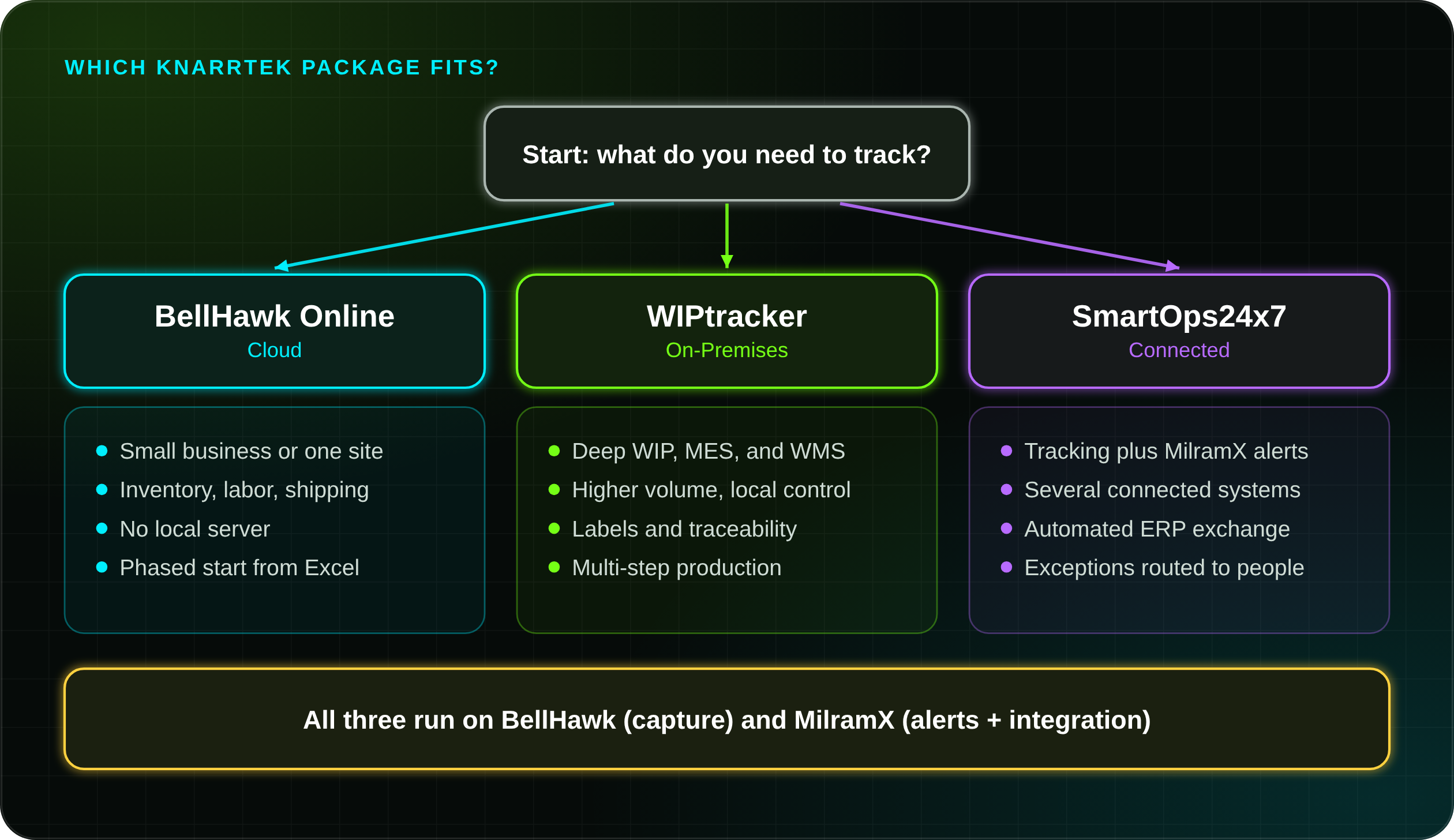
KnarrTek solutions are built on BellHawk and MilramX. BellHawk handles real-time tracking of inventory, WIP, production, and warehouse activity, with barcode and RFID capture, label printing, labor reporting, job costing, quality records, and materials traceability. MilramX adds intelligent agents for alerts, automated information exchange, reporting, and decision support.
What is BellHawk Online best for?
BellHawk Online is the cloud option of KnarrTek industrial tracking software: browser-based tracking of inventory, production, labor, and shipping, with no local server to maintain. It suits small businesses and teams that want a practical, phased way to replace spreadsheets.
What is WIPtracker best for?
WIPtracker is the on-premises package for deeper work-in-process, MES, WMS, quality, labeling, and traceability needs. It fits higher-volume operations, more advanced workflows, and facilities that want local control, with jobs tracked through many operations and ERP-connected workflows.
What is SmartOps24x7 best for?
SmartOps24x7 combines real-time tracking with MilramX alerts, monitoring, automated information exchange, and decision support. It fits operations that need the system to watch for exceptions and route information, such as time-sensitive orders, multi-system workflows, and customer-specific processes.
Does KnarrTek offer cloud-based and on-premises options?
Yes. Cloud options suit smaller teams, multiple locations, and phased projects. On-premises options suit facilities that need local network access, higher-volume capture, specific security policies, or tighter control. Hybrid setups combine the two. The right fit depends on workflow, devices, users, data volume, compliance, and integration needs.
How much does KnarrTek industrial tracking software cost?
BellHawk Online starts at $450 per month with annual prepay. WIPtracker and SmartOps24x7 are quoted after a short workflow review, because price depends on users, sites, devices, integrations, and scope. Contact KnarrTek for a quote.
ERP Integration, Shop Floor Data, and Alert FAQs
How floor activity reaches ERP, accounting, and reporting, and how managers hear about problems sooner.
- ERP integration
- shop floor data capture
- automated data exchange
- alerts
- reporting
Can KnarrTek connect shop floor tracking data to ERP?
Yes. ERP systems are strong for finance, purchasing, and planning but often depend on late manual updates from the floor. BellHawk captures detailed transactions, and MilramX exchanges selected data with ERP, accounting, reporting, customer, and supply chain systems, reducing duplicate entry and giving managers a current view.
Do we have to replace our ERP?
No. KnarrTek industrial tracking software works alongside your existing ERP or accounting system. It captures what happens on the floor and shares selected data with ERP, so each system does what it does best.
Can KnarrTek replace spreadsheets and paper travelers?
Yes. Spreadsheets, paper travelers, handwritten logs, and whiteboards become hard to manage when many people need current data or traceability matters. KnarrTek replaces them with barcode scanning, mobile capture, browser screens, label printing, alerts, and ERP-connected workflows, so less time goes into chasing updates.
Can KnarrTek send alerts to managers?
Yes. Industrial tracking software alerts can cover late jobs, missing materials, quality holds, inventory shortages, unexpected movements, order changes, shipping issues, and integration events. MilramX intelligent agents monitor data, evaluate conditions, and route the alert to the right person, so managers do not have to check every system all day.
Can KnarrTek support customer-specific reports?
Yes. Industrial tracking software reports can cover inventory, WIP status, job history, traceability, label history, receiving, production output, labor, shipping, exceptions, and management review. Good reports start with accurate capture, so KnarrTek focuses on recording the right transactions at the right point in the workflow.
Industries That Use KnarrTek Industrial Tracking Software
Different industries ask the same core questions: what arrived, where it is, which job used it, what changed it, who checked it, and which customer received it.
- food and beverage
- pharmaceutical
- medical device
- industrial distribution
- construction
- aerospace and defense
Who uses KnarrTek industrial tracking software?
Machine shops, custom and contract manufacturers, roll converters, plastic molders, building component fabricators, repair organizations, food processors, pharmaceutical, biotech, and medical device companies, cosmetic and chemical manufacturers, aerospace and defense suppliers, industrial distributors, warehouses, and construction supply chains.
Does KnarrTek help food and beverage processors?
Yes. Food and beverage processors need supplier lot tracking, ingredient traceability, production records, label control, inventory accuracy, quality checks, and recall support. KnarrTek captures raw material movement, ingredient usage, work orders, finished goods, and customer shipments, which shortens searches during audits and recall investigations.
Does KnarrTek support pharmaceutical and medical device operations?
Yes. These operations need control over materials, lots, serial numbers, labels, inspections, status changes, and audit trails. KnarrTek captures that data as part of daily work instead of reconstructing it later. The software supports documentation; it does not certify compliance, and compliance responsibility remains with the customer.
Does KnarrTek help construction suppliers and industrial distributors?
Yes. These businesses handle bundles, rolls, reels, lengths, pallets, serialized assets, and project-specific material tied to customers and jobs. KnarrTek improves receiving accuracy, warehouse inventory tracking, material movement, shipment records, and traceability when customers need proof of what shipped and where it came from.
Can KnarrTek support aerospace, defense, and quality-driven supply chains?
Yes. These supply chains need material history, serial tracking, inspection records, controlled processes, supplier traceability, and shipment visibility. KnarrTek captures those records through barcode scanning, mobile capture, container tracking, WIP tracking, and ERP-connected workflows, so traceability is part of the process rather than a separate task.
Is KnarrTek a good fit for family-owned industrial businesses?
Yes. Many family-owned manufacturers and distributors want better tracking without an overwhelming software project. KnarrTek starts with the operational problem, such as inaccurate inventory, missing WIP, spreadsheet dependence, or shipping errors, and expands in phases with responsive, friendly support.
How Industrial Tracking Software Projects Start, Pilot, and Expand
What to expect from the first conversation through go-live and ongoing support.
- workflow review
- pilot project
- labels and scanners
- phased rollout
- support
How does a KnarrTek project usually start?
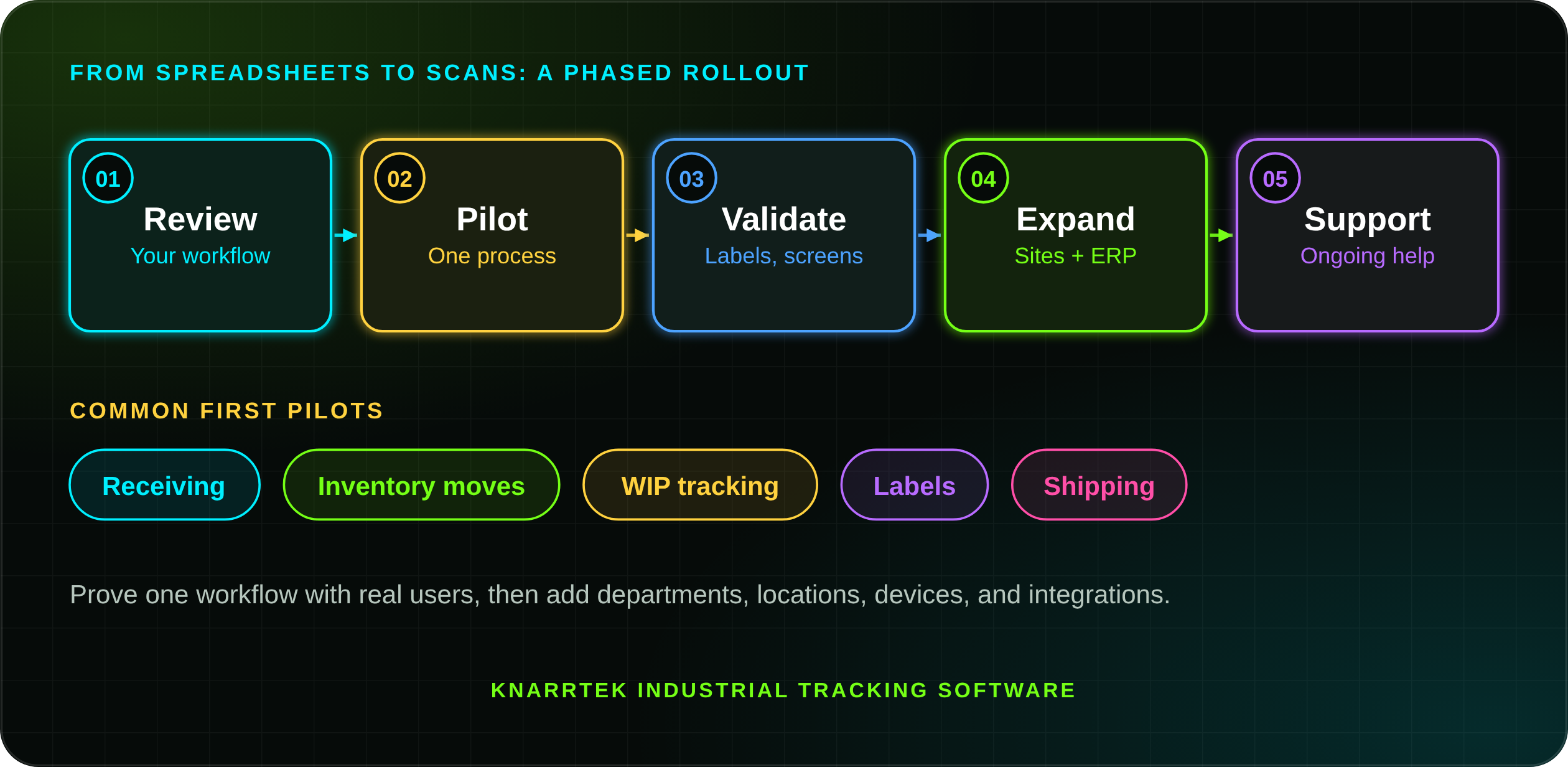
With a review of your workflow: what you track today, where information breaks down, which systems you use, who needs to capture data, and which reports or integrations matter most. The design then follows how your people actually work, not a generic template.
Can KnarrTek start with a pilot project?
Yes. Many projects begin with a pilot on one workflow, such as receiving, inventory moves, WIP, labels, or shipping. The pilot tests scan steps, labels, screens, and reports with real users before the industrial tracking software expands to more departments, locations, or integrations.
How long does implementation take?
It depends on scope: the number of workflows, sites, devices, labels, and integrations. A focused pilot is much shorter than a multi-site rollout with ERP integration. KnarrTek gives you a plan and timeline after the workflow review.
Do you offer demos or a trial?
Yes. You can watch demonstration videos, request a live demo, or ask about a BellHawk trial. Demos focus on your materials, labels, and workflow so you can see how the software would fit.
What should we prepare before contacting KnarrTek?
Helpful details: your industry, current tracking method, ERP or accounting system, number of users and locations, barcode or RFID needs, label requirements, production steps, warehouse locations, quality and compliance needs, reports, and deployment preference. Most of all, name the biggest pain point, such as inventory errors, missing WIP, traceability gaps, or duplicate entry.
Does KnarrTek provide support after implementation?
Yes. KnarrTek support services help configure, maintain, improve, and troubleshoot your system, including workflow adjustments, user guidance, report and label changes, integration support, device help, and data review. As products, customers, and requirements change, support keeps the tracking system aligned with how the business runs.
Where KnarrTek Works: Massachusetts, Florida, and Global
KnarrTek works from two U.S. offices and supports customers wherever they operate.
- Millbury, MA
- Panama City, FL
- New England
- United States
- Mexico and Canada

Millbury, Massachusetts
2 Jacques Pkwy, Millbury, MA 01527, serving New England and the U.S.
Panama City, Florida
Supporting customers across the Southeast and beyond.
U.S., Canada, Mexico
Current accounts in Mexico and Canada.
Multi-Site Operations
Cloud, on-premises, and hybrid deployments.
Where is KnarrTek located?
KnarrTek's corporate office is at 2 Jacques Pkwy, Millbury, Massachusetts 01527, and the company also has an office in Panama City, Florida. You can reach the team at 774-415-7878 or Sales@KnarrTek.com.
Is KnarrTek industrial tracking software available outside the United States?
Yes. KnarrTek operates globally, with current accounts in Mexico and Canada. Cloud, on-premises, and hybrid deployments support teams working across facilities, regions, and supply chain partners.
Can KnarrTek support multiple facilities?
Yes. KnarrTek industrial tracking software supports single sites, multiple facilities and warehouses, distributed production, and partners in different regions, tracking inventory by facility, jobs by area, and shipments by warehouse. The best setup depends on deployment model, internet access, devices, ERP integration, and how each location shares data.
Explore the Pages That Match Your Tracking Problem
Each of these pages goes deeper on one part of KnarrTek industrial tracking software.
Compare Packages
BellHawk Online, WIPtracker, and SmartOps24x7 side by side.
View Products CloudBellHawk Online
Cloud inventory, production, labor, and shipping tracking for smaller teams.
View BellHawk Online CapabilityWIP Tracking
Follow jobs, operations, labor, materials, and production status in real time.
View WIP Tracking CapabilityInventory and Asset Tracking
Warehouse, stockroom, location, picking, packing, and shipping visibility.
View Inventory Tracking PlatformMilramX
Intelligent agents for alerts, data exchange, reporting, and decision support.
View MilramX ServicesSupport Services
Help configuring, maintaining, and improving your tracking system.
View SupportWant more technical reading? Dr. Peter Green's articles on tracking, traceability, and operations software are in the KnarrTek white paper library, and short product walkthroughs are on the demo videos page.
Have a Question That Is Specific to Your Operation?
Tell us what you need to track, where your current process slows down, and which systems your team already uses. You'll get quick, friendly answers from people who know industrial tracking software, by phone at 774-415-7878 or email at Sales@KnarrTek.com.
- Inventory
- WIP
- Traceability
- ERP Connected
