
Weigh Scale Software for Accurate Inventory and Faster Operations
KnarrTek weigh scale software connects your existing scales directly to inventory, work-order, traceability, and labeling transactions. Weight is read from the scale rather than typed by an operator, tare is pulled from the container record, net weight is calculated automatically, and the result is written to a single operational database in real time. Manufacturers, food processors, chemical blenders, laboratories, and distributors use it to capture inventory by weight, eliminate keying errors, and reduce the labor spent reconciling counts.
What is weigh scale software?
Weigh scale software turns a measurement into a recorded transaction. Instead of an operator reading a display and typing a number into a form — or writing it on a traveler to be keyed in later — the scale is interrogated directly, the stable reading is confirmed, tare is subtracted, and the net weight is posted against a specific item, lot, container, work order, and location. The weight becomes part of the operational record at the moment the material is handled, which is what makes downstream inventory balances, yield figures, and traceability reports trustworthy.
Automated Weight Capture
The scale is read by the software over its own interface, so the recorded weight is the weight the scale measured — not a transcription of it.
Weight-Based Inventory Software
This is weight-based inventory software at work: materials stocked by weight get real quantities on hand, with receipts, issues, moves, returns, and adjustments all posted from measured net weight.
Gross, Tare & Net Control
Container tare is stored against the container record and recalled on scan, giving you consistent net weight tracking on every shift and every station.
Unit-of-Measure Conversion
Stored conversion factors turn net weight into count, length, or area, so material weighed in kilograms can be stocked, issued, and reported in its own unit — the same logic behind catch-weight inventory software for retail and food-service case labeling.
Where weight data is lost today
Most plants already own accurate scales. What they usually lack is a reliable path from the scale display into the system of record. Every hop in that path — a written figure, a re-keyed number, a batch upload at end of shift — is a place where accuracy and timeliness are lost. Weigh scale software exists to close that gap.
Transcription Errors
A digit dropped or transposed between the scale display and the keyboard becomes a permanent inventory error that nobody can trace back to its source.
Inconsistent Tare
Operators estimate container weight, use a standard tare that no longer matches the container, or forget to tare at all — and net weight drifts from run to run.
Delayed Posting
Weights recorded on paper and entered hours later mean inventory balances, WIP, and available-to-promise figures are always describing the past.
Unexplained Yield Variance
Without measured input and output weights per work order, material loss, overfill, giveaway, and scrap all collapse into one number nobody can act on.
Weight Missing from Labels
Container and shipping labels printed without measured net weight force a second weighing at pack-out, at the dock, or at the customer.
Broken Lot Genealogy
When the weight is captured separately from the lot and container identifiers, there is no reliable record of how much of which lot went into which output.
What KnarrTek weigh scale software does
Scale capture is not a standalone feature in KnarrTek's weigh scale software. It is a data source wired into the same inventory, work-order, quality, labeling, and integration engine that handles barcode and RFID data, so a weight arrives already attached to the item, lot, container, operator, and job it belongs to.
Direct Scale Interfacing
Scales are polled on a configurable interrogation cycle. The software takes repeated readings and only accepts the value once the reading is stable, so it never records a weight mid-swing.
Multi-Scale Weigh Stations
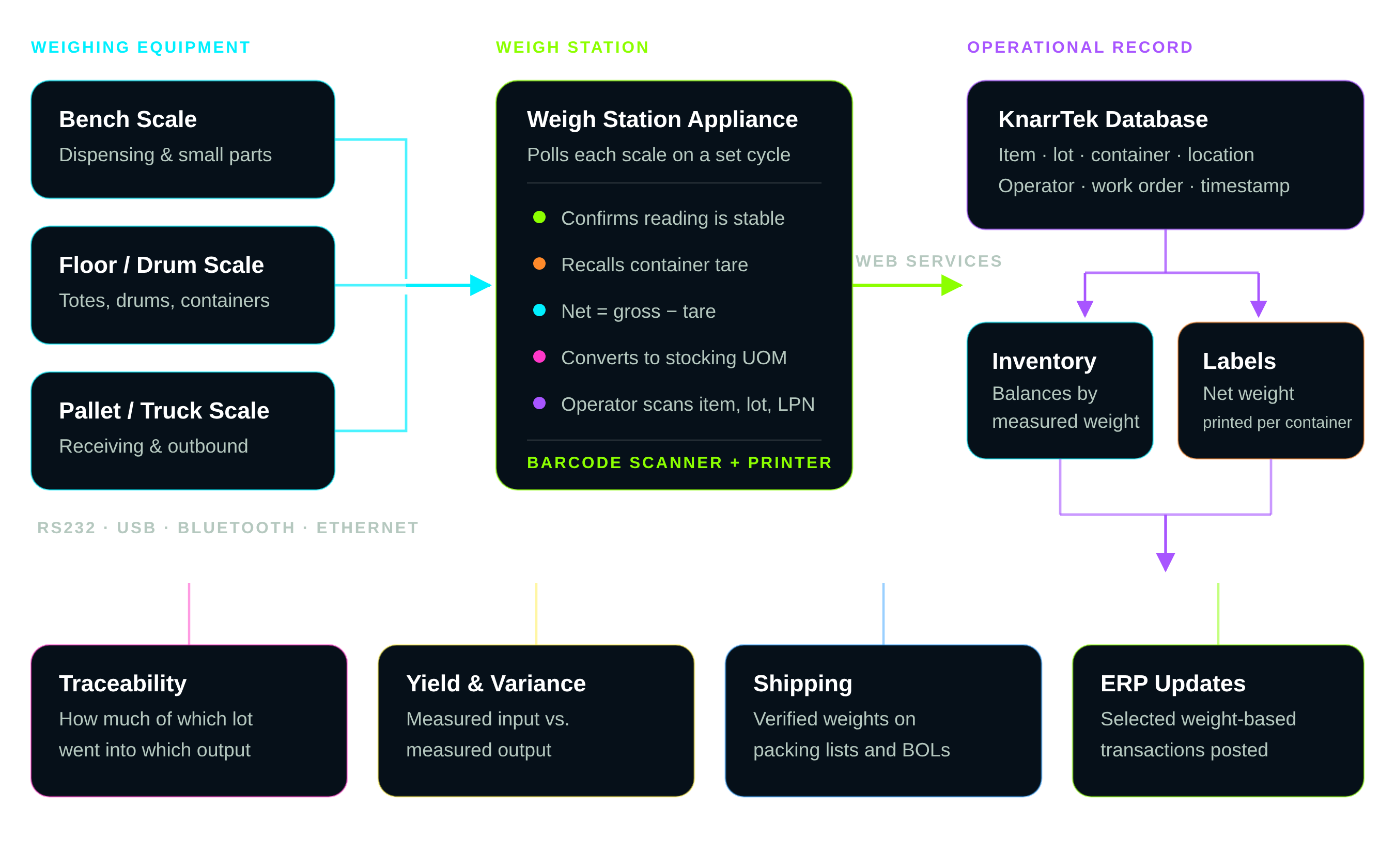
Several scales — a bench scale for small dispenses, a floor scale for drums, a pallet scale for outbound — can be served from one station, with the operator selecting a scale by scanning its barcode.
Tare & Net Weight Tracking
Measured gross weight and the stored tare for the scanned container are displayed together, net is calculated as gross minus tare, and the net value is what posts to the database.
Weight-Driven Transactions
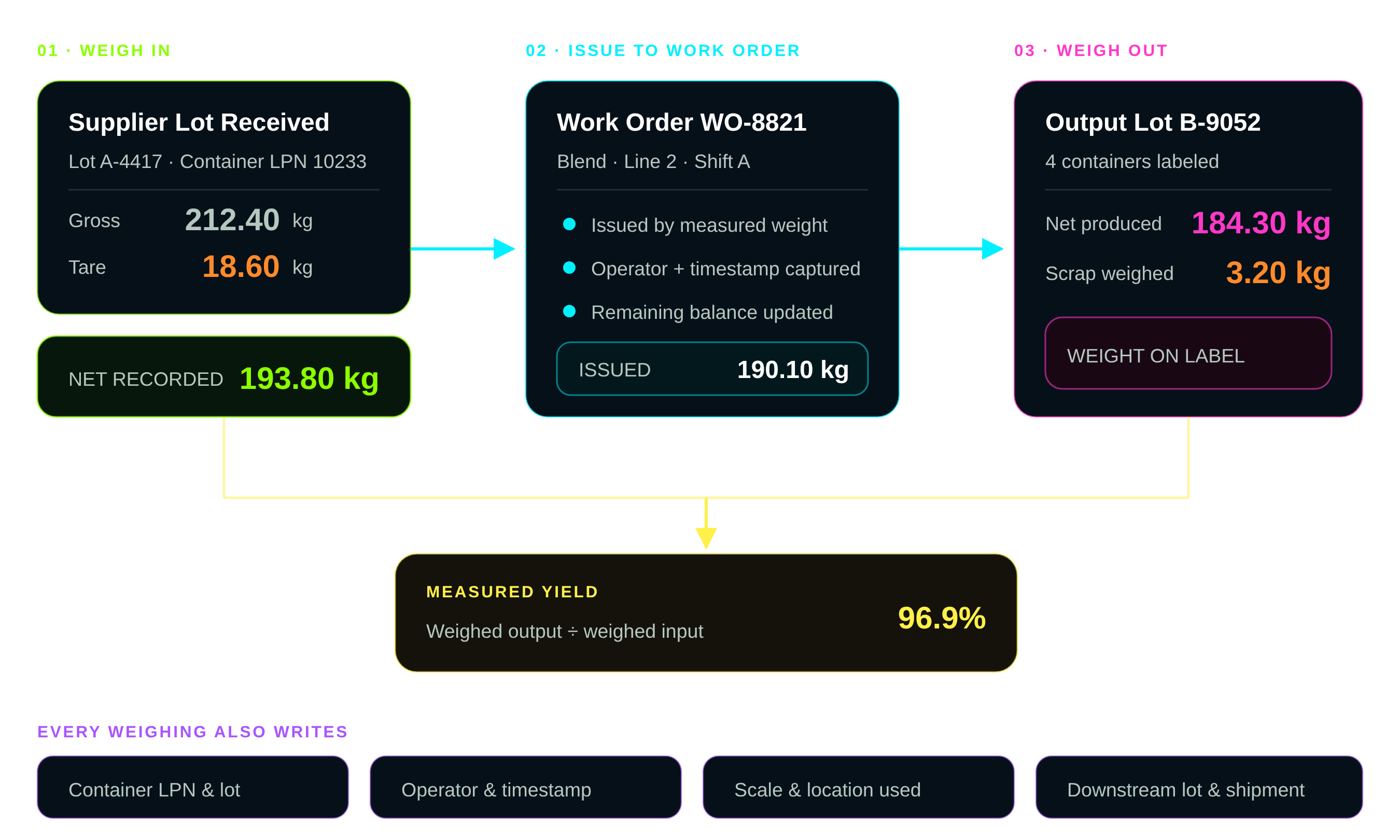
Any transaction whose primary or secondary unit of measure is weight-based can be completed from the scale: receiving, put-away, picking, issue to work order, production reporting, and shipping.
Weight on Container Labels
With a printer at the station, a label is produced for each container carrying its net weight along with item, lot, expiration, and the license-plate barcode used for all later handling.
Lot & Container Genealogy
Because the weight is captured against a scanned container and lot, the record shows how much of each input lot went into each output lot, batch, or shipment.
Yield & Variance Reporting
Measured input and output weights per work order produce real yield, giveaway, and loss figures — by job, by line, by shift, and by material.
ERP & Business System Updates
Selected weight-based transactions flow to ERP, accounting, and reporting systems, so purchasing and finance work from the same measured quantities as the plant floor.
From scale cable to system of record
A scale controller is connected to a weigh station appliance — typically a small industrial Windows unit sited at the weighing point, though the software can run on any suitable Windows computer. The station polls each connected scale, watches for a substantial change in reading, confirms the value has settled, and then sends the confirmed weight to the KnarrTek web-services interface, where it is written to the operational database against the transaction in progress.
- RS232 as standard, with USB, Bluetooth, and Ethernet scale controllers also supported.
- Multiple scales per station, each selected by the operator scanning that scale's barcode.
- Scale parameters configured by spreadsheet import — name, interrogation period, units, and stability threshold.
- Unusual scale protocols can be accommodated through configuration or customization of the interface software.
- Cloud deployments need only ordinary internet access from the station; no inbound firewall changes are required.
- A printer at the station turns the station into a full labeling point for weighed containers.
What happens at the weigh station
Each of these steps in KnarrTek's weigh scale software is a real sequence an operator performs, and each one writes something to the record. The order matters: the identifiers are captured before the weight, so the weight has somewhere to go the moment it settles.
Identify
Operator scans their badge, the item or lot barcode, and the container license plate. The transaction context is established first.
Select Scale
The correct scale is chosen by scanning its barcode, so the reading is attributed to the right device and the right capacity range.
Tare
The stored tare for the scanned container is recalled and shown next to the live gross reading, rather than being estimated or re-entered.
Weigh
The station reads the scale repeatedly, waits for the value to stabilize within threshold, and accepts the confirmed gross weight.
Convert
KnarrTek's weigh scale software calculates net weight and, where the material is stocked another way, converts it to count, length, or area using its stored factor.
Post & Label
The transaction is written to the database, a container label with net weight is printed, and selected data is passed to ERP.
Where captured weight improves operational efficiency
The value of weigh scale software is rarely in the seconds saved at the keyboard. It is in everything that stops going wrong once the weight is right the first time: cycle counts that reconcile, work orders that close with a believable yield, shipments that do not get re-weighed, and recall investigations that finish in minutes instead of days.
- Fewer inventory corrections. Measured net weight removes the keying errors that cycle counts exist to find.
- Shorter transactions. Scan, weigh, accept — no reading a display, no writing it down, no keying it later.
- Real yield figures. Weighed input against weighed output shows loss, giveaway, and overfill by job and by line.
- Less overfill. Filling to a target net weight rather than by eye protects margin on every container.
- No second weighing. Weight is on the container label from the first handling, through pack-out to the dock.
- Faster recall response. Quantities by lot and container are already recorded, so the affected scope is a query, not an investigation.
- Fewer disputes. Shipped weights are measured, timestamped, and attributable to a scale and an operator.
Two ways weigh scale capture is deployed
Weigh scale software supports a range of deployment shapes. These are representative patterns rather than a specific customer's results, described so you can recognize which one resembles your own operation.
Formulated products weighed to target
Operators dispense multiple raw materials against a formula, each to a target net weight, into a labeled container that carries its identity through the rest of the process.
A bench scale and a floor scale share one weigh station. The operator scans the work order, the raw material lot, and the destination container; the software recalls the container tare and shows the live net weight against the formula target as material is added. Each dispense posts an issue transaction and prints a label carrying the item, lot, and measured net weight.
Dispensing accuracy against formula, elimination of hand-written dispense sheets, and a complete record of which input lots and quantities went into each batch.
Bulk materials received and shipped by weight
Inbound containers are weighed on receipt and outbound pallets on dispatch, so the quantity on the record is always the quantity that was measured.
A pallet scale at the dock is connected to the receiving station. Purchase-order receipts are posted from measured net weight rather than the quantity on the supplier's paperwork, and discrepancies are visible immediately. At shipping, the same station weighs outbound pallets and prints labels and packing documentation carrying verified weights.
Receipt accuracy against supplier documentation, freight and shipping-weight disputes, and the time spent re-weighing material that was already on a scale once.
These are representative application studies, not guaranteed outcomes. Actual results depend on scale hardware and protocols, station placement, network conditions, process design, implementation scope, data quality, integrations, procedures, training, and user adoption.
Three ways to run weigh scale software
Scale capture is available across the KnarrTek product line. Which package fits depends on how much of your operation runs through the system, how you prefer to deploy it, and how much automation you want around exceptions.
BellHawk Online
Browser-based inventory and production tracking with weigh stations connecting over ordinary internet access — no inbound firewall changes and no local server to maintain.
WIPtracker
On-premise MES and WMS control for plants that want deeper local control over weigh stations — KnarrTek's weigh scale software keeps detailed operational records, with scale capture wired tightly into work-order execution.
SmartOps24x7
A rules-based agent layer that watches weight-based transactions across systems, handles exceptions such as out-of-tolerance weights automatically, and keeps ERP synchronized.
Operations that run on measured weight
Any operation where material is bought, made, stocked, or sold by weight has a case for weigh scale software that captures that weight automatically. These are the settings where it changes the most.
Food & Beverage
Catch-weight inventory software for ingredient dispensing, portion control, and lot traceability from receipt to case label.
Chemical & Coatings
Formula dispensing to target weight, drum and tote tare control, and batch genealogy across blends.
Pharmaceutical & Nutraceutical
Controlled dispensing, container-level records, and quantity evidence attached to lot and operator.
Laboratories
Reagent and sample weighing, aliquot records, and container-level inventory that stays current.
Metals & Plastics
Weight-to-length and weight-to-count conversion for coil, bar, resin, and regrind handled by mass.
Warehousing & Distribution
Receipt verification against supplier documents, pallet weights, and verified outbound shipping weights.
Recycling & Waste
Inbound and outbound weighing by material stream, with weights tied to customer, container, and load.
Contract Manufacturing
Customer-owned material weighed in and out, with consumption and yield evidence per job.
Weight is one signal among several
Weigh scale software works alongside the other ways KnarrTek collects data at the point of work. Most deployments combine two or three of these.
Inventory & Asset Tracking
Real-time balances by item, lot, container, and location — the record that weight-based inventory software transactions post into.
Inventory trackingMaterials Traceability
Lot genealogy that links measured input quantities to the output lots, containers, and shipments they became.
Materials traceabilityReal-Time WIP Tracking
Work-in-process visibility, so weighed issues and outputs land against the right job at the right operation.
WIP trackingBarcode Tracking
The scans that identify the item, lot, container, scale, and operator before the weight is taken.
Barcode trackingRFID Tracking
Hands-free container and asset identification where scanning a barcode at the scale is impractical.
RFID trackingMaterials Flow & Job Tracking
Movement and job progress across the plant, giving weighed transactions their operational context.
Job trackingCommon questions about scale integration
Practical answers about weigh scale software hardware, protocols, deployment, and what it does with a weight once it has one.
Do I have to replace my existing scales?
How does the scale physically connect?
How does the software know the weight has settled?
Where does tare weight come from?
What if we stock the material in a different unit?
Which transactions can be completed from a scale?
Can the weight be printed on the container label?
How are scales set up in the system?
Does the cloud version need firewall changes?
Can one station serve several scales?
How does this support traceability and recall?
What does an implementation involve?
Stop typing weights that a scale already measured.
Start with a single weighing point that causes you the most trouble. KnarrTek's weigh scale software specialists can help map the scales, containers, transactions, labels, conversions, users, and integrations needed to turn measured weight into accurate inventory and a traceable operational record.
