

WMS Software for Faster, More Accurate Warehouse Operations
Streamline receiving, picking, shipping, inventory control, asset tracking, and warehouse visibility with a real-time warehouse management system (WMS).
BellHawk's WMS helps manufacturers, distributors, food processors, pharmaceutical teams, construction suppliers, and industrial operations replace paper trails with accurate warehouse data. Barcode scanning, license-plate container tracking, RFID, mobile updates, and ERP-connected workflows help teams move faster without losing control.
- Receiving
- Picking
- Shipping
- Inventory
Turn shipping, receiving, and inventory control into one connected WMS workflow
A WMS should do more than record transactions after the fact.
BellHawk helps warehouse teams capture movement as it happens, which means receiving, putaway, picking, packing, shipping, inventory adjustment, and material movement activity can be tracked in real time. A system built on live data gives supervisors an accurate picture of what is on hand, where it is stored, and what is ready to ship.
This is especially important for warehouse operations that handle regulated materials, customer-specific orders, perishable inventory, multi-site transfers, serialized items, or complex containers. When the warehouse has better data, managers can reduce delays, prevent missed shipments, improve order fulfillment, and make decisions with greater confidence.
Faster receiving
Barcode-driven receiving logs materials instantly and reduces the manual entry delays that slow down warehouse operations.
Better warehouse control
LPN tracking, RFID, and mobile inventory updates keep material and container status current across the operation.
More reliable fulfillment
Final verification helps ensure the right items, quantities, and containers are picked, packed, and shipped.

6 key features of BellHawk's WMS software
BellHawk helps warehouse teams improve accuracy, throughput, inventory visibility, traceability, and warehouse control with software built for real-world operations.
Efficient receiving
Barcode scanning logs materials into the system as they arrive, reducing manual entry and accelerating inbound processing.
Optimized picking
Picking workflows help staff assemble orders faster, reduce unnecessary travel, and improve order accuracy.
Accurate shipping
Shipment verification confirms the correct items and quantities before dispatch, helping reduce returns and customer issues.
Mobile tracking
Warehouse staff can update receiving, movement, picking, and inventory transactions from the floor in real time.
Error reduction
Automated tracking helps reduce manual discrepancies, missed transactions, misplaced materials, and disconnected records.
Compliance support
Traceability records and audit trails can help support GS1, regulated workflows, and 21 CFR Part 11 oriented operations.
BellHawk supports documentation and does not certify. Compliance responsibility remains with the customer.
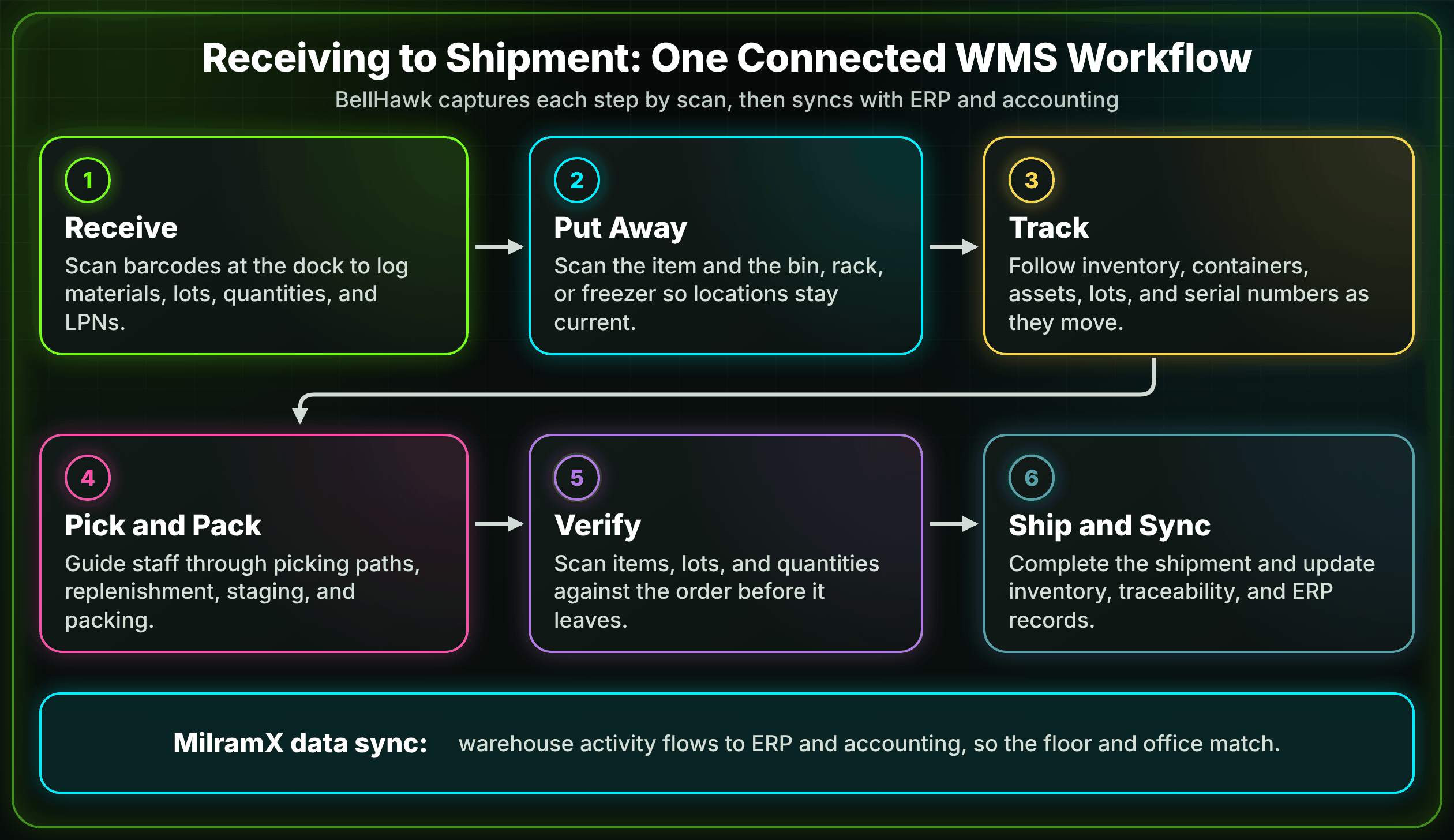
Track warehouse activity from receipt to shipment
BellHawk creates a live warehouse data layer that helps teams know what was received, where it was placed, who picked it, what was packed, what was verified, and when it shipped. MilramX can support data movement between warehouse activity and connected ERP or accounting systems.
Receive materials
Log incoming materials with barcode scans, quantities, lot details, LPNs, and receiving locations.
Put away inventory
Assign materials to bins, racks, freezers, staging zones, pallets, containers, or warehouse locations.
Track inventory and assets
Monitor inventory, containers, assets, serial numbers, lots, and material movement across locations.
Pick and pack orders
Guide warehouse staff through order picking, replenishment, staging, and packing activity.
Verify before shipment
Validate that the correct items, lots, quantities, and containers are ready before shipment.
Ship and sync systems
Complete outbound transactions and keep inventory, traceability, ERP, and accounting records aligned.
BellHawk's WMS helps warehouses move faster without losing accuracy
BellHawk's WMS transforms warehouses into efficient, data-driven hubs for manufacturers and distributors by optimizing shipping, receiving, inventory control, and asset tracking.
These capabilities are especially valuable for organizations that need to manage fast-moving inventory, multiple warehouse locations, regulated materials, customer-specific orders, construction materials, or high-accuracy fulfillment requirements. It gives those teams one live record instead of separate spreadsheets, paper pick tickets, and disconnected counts.
The receiving process becomes more efficient because barcode scanning logs materials directly into the system. This helps eliminate manual data entry mistakes, improves traceability, and gives the team real-time inventory updates from the beginning of the workflow. In regulated industries such as food processing and pharmaceuticals, this speed and accuracy are critical because perishable or sensitive goods must be handled quickly and documented correctly.
BellHawk also improves picking and packing by helping teams follow more efficient paths and more reliable verification steps. Optimized picking reduces wasted travel time within the warehouse, while shipping verification helps ensure customers receive the right products, quantities, containers, and documentation. This reduces returns, prevents missed shipments, and supports stronger customer satisfaction.
Multi-site warehouse visibility
Multi-site inventory management gives manufacturers and distributors better visibility across complex operations. Real-time warehouse tracking can help reduce stockouts, improve replenishment decisions, support just-in-time processes, and coordinate activity across multiple warehouses, plants, freezers, distribution sites, or storage areas.
BellHawk RFID and BarcodeRFID and barcode tracking
Barcode scanning and RFID tracking allow teams to move faster while maintaining better control. RFID can be especially useful for high-volume movements, sensitive materials, perishable goods, or environments where speed and tracking precision matter. Barcode scanning provides a practical way to identify items, containers, locations, orders, and assets.
Barcode tracking Data SyncERP and accounting data sync
MilramX extends BellHawk's value by helping align warehouse data with ERP and accounting systems. Warehouse movements do not stay trapped in one application. Inventory activity, order status, shipping updates, and exceptions can flow into connected business systems so managers can make faster and more informed decisions.
MilramX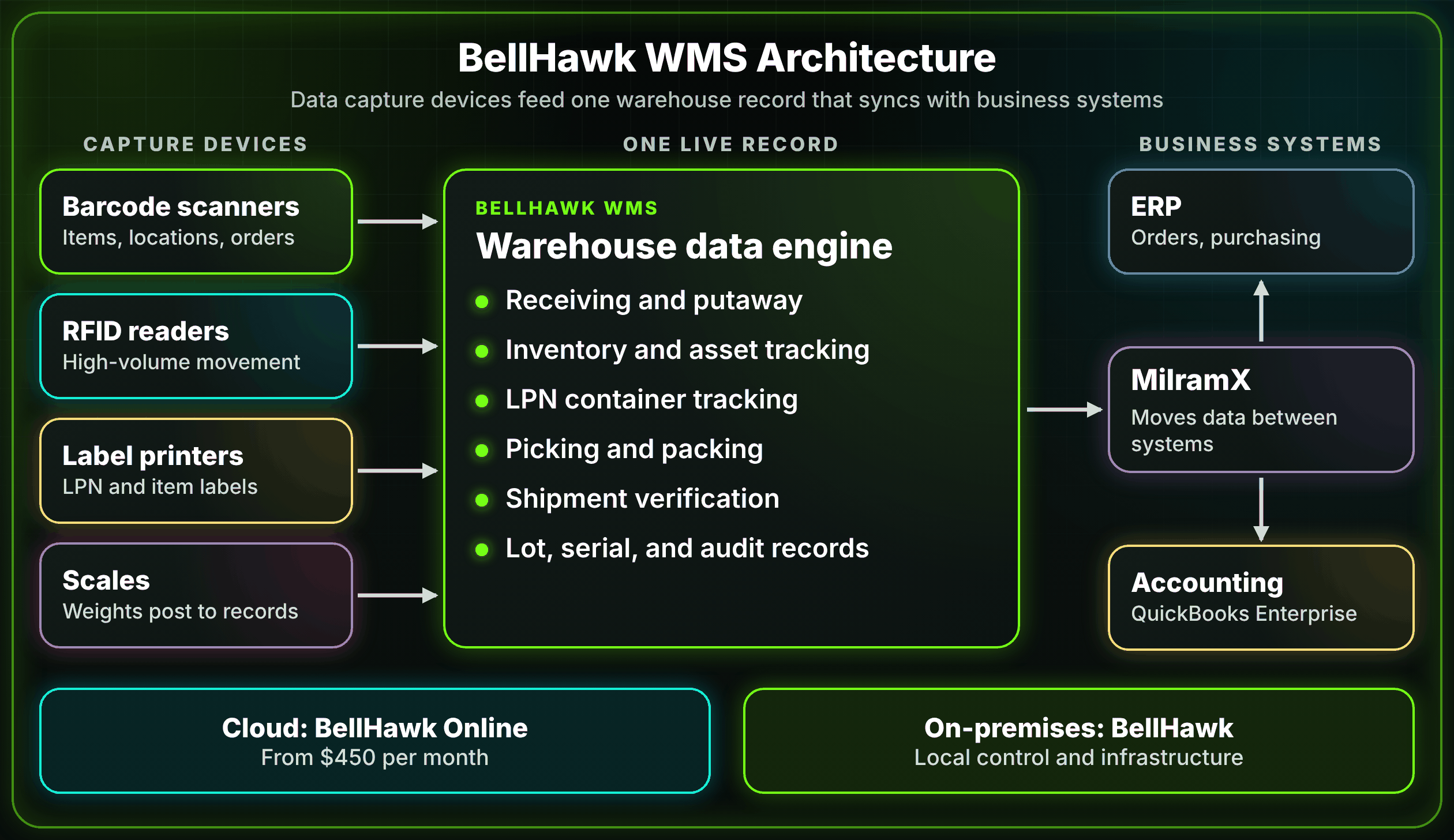
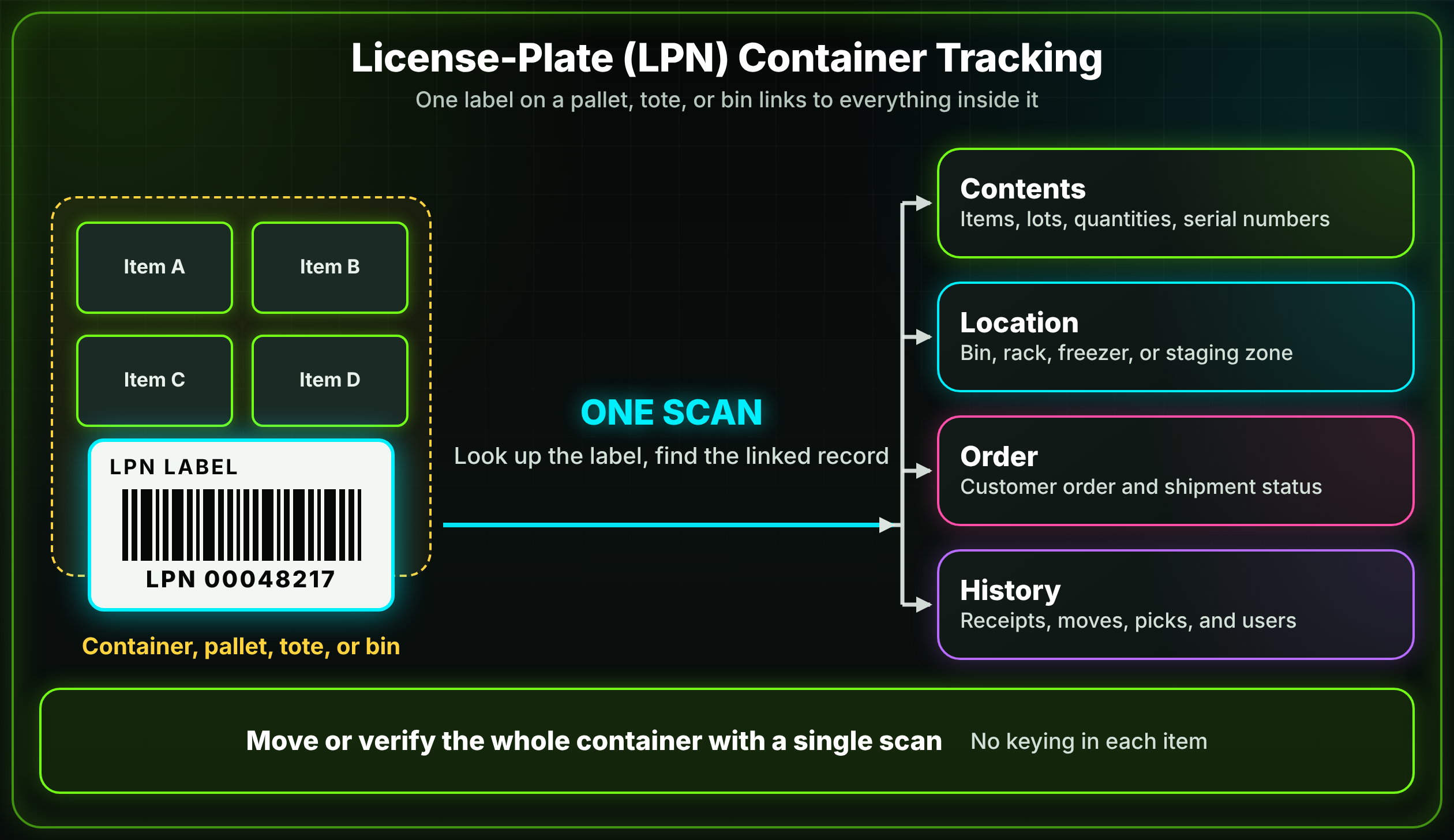
License-plate tracking makes warehouse work faster
An LPN label on a container, pallet, tote, or bin lets staff move and verify everything inside with one scan. The system looks up the contents, location, order, and history linked to that label, so there is no need to key in each item.
Built for warehouse operations that cannot afford mistakes
BellHawk supports warehouse operations where inventory accuracy, traceability, order fulfillment, and material movement matter every day. Whether the warehouse is supporting production, distribution, field installation, regulated handling, or customer shipments, a real-time WMS helps keep teams aligned.
Fast receiving and food safety traceability
Support fast receiving, lot tracking, expiration visibility, cold storage control, and food safety traceability.
Food traceability PharmaceuticalsControl of sensitive materials
Improve control of sensitive materials, audit trails, label validation, compliance records, and regulated warehouse handling.
Pharmaceutical Industrial DistributionReceiving through multi-site visibility
Coordinate receiving, picking, replenishment, order fulfillment, shipping, and multi-site inventory visibility.
Distribution Construction MaterialsFrom warehouse receipt to jobsite
Track materials, pallets, bundles, containers, and custody from warehouse receipt to jobsite use or installation.
ConstructionChoose the WMS model that fits your environment
BellHawk can support different warehouse environments, from growing teams that want cloud flexibility to larger operations that need on-premises control, connected systems, barcode infrastructure, or specialized data exchange.
Cloud WMS
Scalable for small and mid-sized businesses that want lower infrastructure overhead and easier growth. BellHawk Online is the cloud option and starts at $450 per month.
BellHawk Online On-PremisesOn-premises WMS
Ideal for operations that need more control, local infrastructure, or tighter internal security requirements.
BellHawk ConnectedConnected operations
MilramX supports data exchange across ERP, accounting, scanners, labels, RFID, and warehouse workflows.
Compare productsWhat better warehouse control can improve
BellHawk helps warehouse teams increase visibility, reduce errors, improve fulfillment, and make decisions with better operational data from their warehouse system.
Grow without outgrowing your system
Cloud and on-premises options support different infrastructure needs and operational complexity.
Coordinate across locations
Real-time tracking helps teams manage inventory and workflows across warehouses, plants, or distribution sites.
Speed up tracking
RFID can accelerate scanning and improve material visibility in high-volume or sensitive environments.
Ship more reliably
Accurate picking and final verification help improve on-time deliveries and reduce customer issues.
Reduce overtime and avoidable errors
Improved accuracy and better labor efficiency can help reduce inventory mistakes, rework, and fulfillment costs.
Keep systems aligned
ERP and accounting integration helps decision-makers work from more current and reliable warehouse data.
Paper and spreadsheets compared with a BellHawk WMS
Recording warehouse activity as it happens changes how quickly teams can find materials, verify shipments, and answer customer questions.
| Warehouse area | Paper and spreadsheets | BellHawk WMS |
|---|---|---|
| Receiving | Keyed in after the truck is unloaded, so records lag behind the dock. | Barcode scans log materials, lots, and LPNs as they arrive. |
| Inventory locations | Bin and rack locations drift from what the sheet says. | Putaway and moves are scanned, so locations stay current. |
| Picking | Paper pick tickets and walking to find stock. | Guided picking tied to live inventory and orders. |
| Shipping | Errors found after the customer calls. | Scanned verification of items, lots, and quantities before dispatch. |
| Multi-site | Separate counts for each building. | One record across warehouses, plants, and storage areas. |
| ERP and accounting | Duplicate entry between the floor and the office. | MilramX exchanges data with ERP and accounting systems. |
Interested in learning more? Check out our white papers
Explore practical guides on inventory control, material traceability, error reduction, ERP planning, and warehouse-related tracking topics that support a WMS project.
Taking Inventory
Review practical guidance for improving inventory control and warehouse accuracy.
Open PDF Error ReductionPreventing Inventory Errors
See how stronger processes and better tracking can reduce costly inventory mistakes.
Open PDF TraceabilityInventory Tracking vs. Materials Traceability
Understand how inventory visibility and material traceability support different operational goals.
Open PDF Material TrackingTracking Sheets, Rolls, and Lengths of Material
Learn how to track complex materials that move through warehouse and production workflows.
Open PDF Barcode and RFIDBarcodes vs RFID for Work-in-Process Tracking
Compare barcode and RFID methods for tracking material through operations.
Open PDF ERP PlanningSo You Want to Buy a New ERP System
What to consider before choosing or changing an ERP, and where warehouse and shop floor tracking fit.
Open PDFStreamline workflow optimization and inventory control with a BellHawk WMS.
Stop chasing paper trails and start making real-time decisions. BellHawk helps warehouse teams improve receiving, picking, shipping, traceability, and inventory control with a warehouse management system built for connected operations. Call 774-415-7878 or email Sales@KnarrTek.com and you will get quick, friendly answers from people who know the software. KnarrTek works from offices in Millbury, Massachusetts and Panama City, Florida, and operates globally, with current accounts in Mexico and Canada.
- Real-time visibility
- Barcode + RFID
- Shipping verification
- ERP-connected
WMS FAQs for manufacturers, distributors, and regulated operations
These answers are designed to help operations teams compare WMS software, warehouse inventory tracking, barcode scanning, RFID tracking, ERP integration, and real-time warehouse visibility. See also the industrial tracking software FAQs.
What does a WMS do?
A warehouse management system (WMS) helps teams manage receiving, putaway, inventory movement, picking, packing, shipping, asset tracking, and warehouse documentation. BellHawk gives manufacturers and distributors real-time visibility into warehouse activity, so inventory records are more accurate and fulfillment teams can move faster.
How does BellHawk improve warehouse accuracy?
BellHawk improves warehouse accuracy by using barcode scanning, license-plate container tracking, RFID tracking, mobile inventory updates, final verification steps, and real-time inventory records. These tools help reduce manual entry mistakes, missing transactions, misplaced materials, and incorrect shipments.
Is BellHawk WMS software useful for manufacturers?
Yes. BellHawk is useful for manufacturers that need to control raw materials, components, WIP inventory, finished goods, production supply areas, and warehouse movement. Manufacturers can use BellHawk to connect warehouse inventory with production tracking, material usage, job activity, and ERP updates.
Can BellHawk support distributors and industrial warehouses?
Yes. BellHawk supports industrial distributors and warehouse teams that need better receiving, picking, packing, shipping, customer order fulfillment, cycle counts, inventory transfers, and multi-site inventory visibility. Real-time warehouse tracking helps distributors reduce stockouts, improve customer service, and prevent late or missed shipments.
Can a WMS help with food processing and pharmaceutical compliance?
It can help food processing and pharmaceutical operations by tracking lots, containers, labels, expiration dates, material movement, receiving records, shipping records, and audit history. BellHawk supports traceability workflows that help regulated teams maintain cleaner warehouse records and improve recall readiness. BellHawk supports documentation and does not certify; compliance responsibility remains with the customer.
Does BellHawk support barcode scanning and RFID tracking?
Yes. BellHawk supports barcode scanning and RFID tracking for warehouse inventory management, container tracking, asset tracking, receiving, picking, shipping, and material movement. Barcode scanning is often used for item, location, order, and container identification, while RFID can help speed up high-volume tracking workflows.
Can BellHawk connect warehouse activity with ERP or QuickBooks Enterprise?
Yes. BellHawk and MilramX can support data exchange with ERP systems, QuickBooks Enterprise, accounting systems, label printers, scanners, scales, databases, and other operational systems. ERP integration helps keep warehouse activity aligned with purchasing, inventory, production, accounting, and customer order data.
What types of businesses need a WMS?
This kind of software is useful for manufacturers, industrial distributors, food processors, pharmaceutical companies, construction material suppliers, packaging operations, cold storage facilities, 3PL providers, and businesses with multi-site warehouse operations. Any organization that needs real-time inventory control, accurate shipping, and traceability can benefit.
Does BellHawk support multi-site warehouse management?
Yes. BellHawk can support warehouse inventory visibility across multiple buildings, plants, storage areas, freezers, distribution centers, production areas, and remote locations. Multi-site warehouse management helps teams coordinate inventory, transfers, replenishment, and order fulfillment with better visibility.
Where does KnarrTek provide WMS support?
KnarrTek works from offices in Millbury, Massachusetts and Panama City, Florida, and operates globally, with current accounts in Mexico and Canada. BellHawk can support companies that need local warehouse control, cloud visibility, on-premises deployment, or connected multi-site inventory tracking. You can call 774-415-7878 or email Sales@KnarrTek.com for quick, friendly answers from people who know the software.
How does a WMS improve customer satisfaction?
It improves customer satisfaction by helping teams pick the correct items, verify shipments before dispatch, reduce missed orders, avoid delays, and maintain more accurate inventory. When warehouse operations are more reliable, customers receive the right materials on time with fewer fulfillment problems.
What makes BellHawk different from basic inventory software?
Basic inventory software may only show item quantities. BellHawk goes further by tracking warehouse movement, containers, LPNs, barcode scans, RFID reads, receiving activity, picking activity, shipping verification, traceability records, and connected ERP workflows. This gives operations teams a more complete view of warehouse performance.
What is a license plate number (LPN) in a WMS?
A license plate number, or LPN, is a unique identifier printed on a label and attached to a container, pallet, tote, or bin. When the label is scanned, the system looks up what the container holds, where it is located, and what has happened to it. LPN tracking lets teams move and verify whole containers with a single scan instead of keying in each item.
How does BellHawk handle putaway?
After materials are received and labeled, BellHawk lets staff assign them to bins, racks, freezers, staging zones, pallets, containers, or other warehouse locations by scanning the item or LPN and the location. The system records the location and keeps it current as materials move, so picking and inventory counts start from accurate data.
Can BellHawk track assets as well as inventory?
Yes. BellHawk supports asset tracking alongside inventory tracking, so teams can follow reusable containers, tools, equipment, and other assets through the warehouse and production areas. Assets can be identified by barcode or RFID and tracked by location, status, and movement history.
What is the difference between a WMS and an MES?
A WMS focuses on receiving, storage, picking, packing, shipping, and inventory control. A manufacturing execution system focuses on production activity such as jobs, work centers, labor, machines, and quality. BellHawk is a data capture engine that supports both MES and WMS functionality, so warehouse activity and production activity can share one connected record.
How does BellHawk support cycle counts and inventory audits?
Staff can scan locations, containers, and items to confirm what is physically on hand and compare it with the system record. Because every receipt, move, pick, and shipment is already recorded, differences are easier to investigate. KnarrTek's white paper on taking inventory explains practical approaches to counting and accuracy.
What hardware does a WMS need?
Hardware depends on the workflow. Most warehouses use barcode scanners or mobile computers and label printers, and some add RFID readers, scales, or fixed readers at dock doors. KnarrTek can help you decide what each process needs so you buy only the equipment that supports your operation. Equipment is priced separately from the software.
Should I choose cloud or on-premises WMS software?
Cloud deployment suits small and mid-sized businesses that want lower infrastructure overhead and easier growth. BellHawk Online is the cloud option and starts at $450 per month. On-premises deployment suits operations that need more local control, local infrastructure, or tighter internal security requirements. KnarrTek can help you compare both.
Do I need to replace my ERP system to use a WMS?
No. BellHawk is designed to work alongside your ERP and accounting systems rather than replace them. The ERP continues to manage orders, purchasing, and financials, while BellHawk captures warehouse activity at the point of work and MilramX helps exchange the data between systems.
How does shipment verification reduce errors?
Before an order leaves the building, staff scan the items, lots, quantities, and containers, and the system checks them against the order. A mismatch is flagged before dispatch rather than after the customer reports it. This helps reduce wrong items, short shipments, returns, and the cost of correcting mistakes later.
Does BellHawk support lot and expiration tracking?
Yes. BellHawk can record lot numbers and expiration information when materials are received and carry them through storage, picking, and shipping. That helps food, pharmaceutical, and other regulated teams find the oldest stock, control expired material, and trace which customers received a given lot.
How does a WMS support recall readiness?
When receipts, moves, picks, and shipments are recorded with lot and container details, a team can look up where a lot came from, where it was stored, and which orders it shipped on. That history is available from one record instead of being reconstructed from paperwork. Recall procedures and regulatory responsibilities remain with the customer.
Where should a company start with a WMS?
Many teams start with receiving, labeling, and inventory locations, because accurate data at intake improves every later step. Picking, shipment verification, RFID, asset tracking, and ERP integration can be added as the team is ready. KnarrTek can help you plan a first phase that fits your operation.
Can I try BellHawk before I commit?
Yes. You can request a demo from KnarrTek or start with the BellHawk trial. Call 774-415-7878 or email Sales@KnarrTek.com to talk through your warehouse workflow with people who know the software.
Where can I learn more about warehouse inventory control?
KnarrTek publishes technical white papers by Dr. Peter Green covering taking inventory, preventing inventory errors, inventory tracking versus materials traceability, tracking sheets, rolls, and lengths of material, barcodes versus RFID, and ERP planning. You can open them from the white paper library linked on this page.
