
Barcode Tracking Software for Real-Time Inventory, WIP, and Container Visibility
KnarrTek barcode tracking software helps manufacturers, distributors, warehouses, and regulated operations connect physical materials to accurate digital records with every scan.
BellHawk and MilramX replace paper forms, handwritten logs, disconnected spreadsheets, and delayed ERP updates. Teams scan incoming materials, label containers, issue components to jobs, track WIP, verify picks, manage LPNs and nested containers, and send validated updates to ERP, accounting, and reporting systems.
How Barcode Tracking Software Works: The Barcode Identifies, BellHawk Tracks
A barcode does not need to store every detail on the label. In barcode tracking software, it acts as the identifier that tells BellHawk which item, lot, serial number, container, pallet, asset, work order, location, or shipment record to open and update.
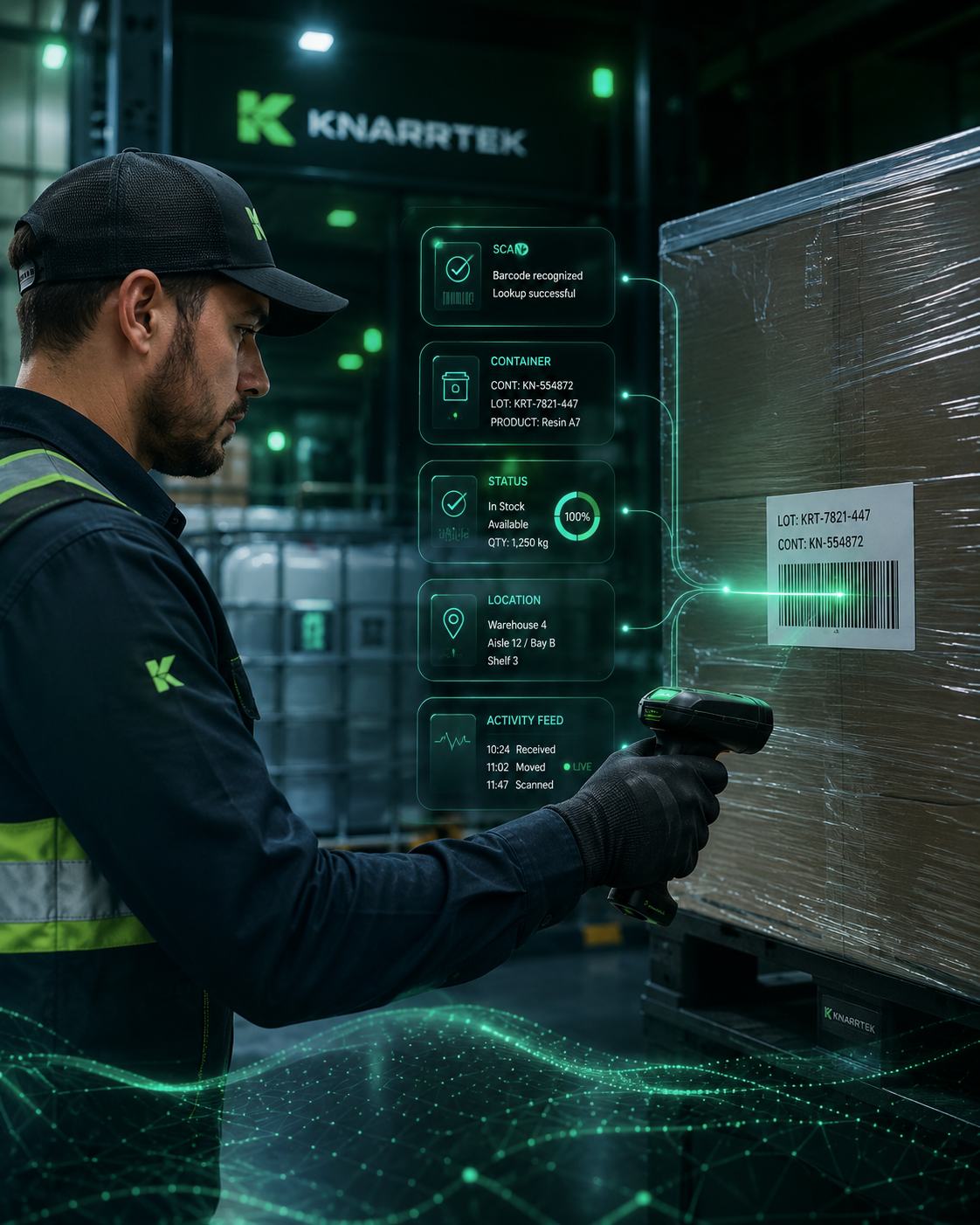
Four steps behind every scan
Barcode is scanned
A worker scans an item, container, pallet, location, work order, asset, or label.
BellHawk finds the record
The identifier tells BellHawk which digital record to open, validate, or update.
Activity is recorded
Receiving, movement, usage, counting, inspection, packing, or shipment activity is saved.
Systems stay aligned
MilramX can exchange validated updates with ERP, accounting, reporting, supplier, or customer systems.
The barcode identifies the physical object.
It may represent an item, lot, serial number, container ID, license plate number, pallet, work order, tool, asset, employee, shipment, location, or customer order.
The database holds the details.
The live record behind the scan can include receiving history, supplier, ownership, lot attributes, expiration dates, quality status, quantity, location, job history, and shipment status.
The scan helps prevent wrong moves.
Two pallets may hold the same item but different lots or orders. A scan validates that the right object is moved, consumed, picked, packed, counted, inspected, or shipped.
Barcode Tracking Software That Captures Activity as Work Happens
Barcode tracking works best when scanning is part of the natural flow of receiving, warehouse movement, production, quality, shipping, and inventory control. Each small scan event adds to one reliable digital history.
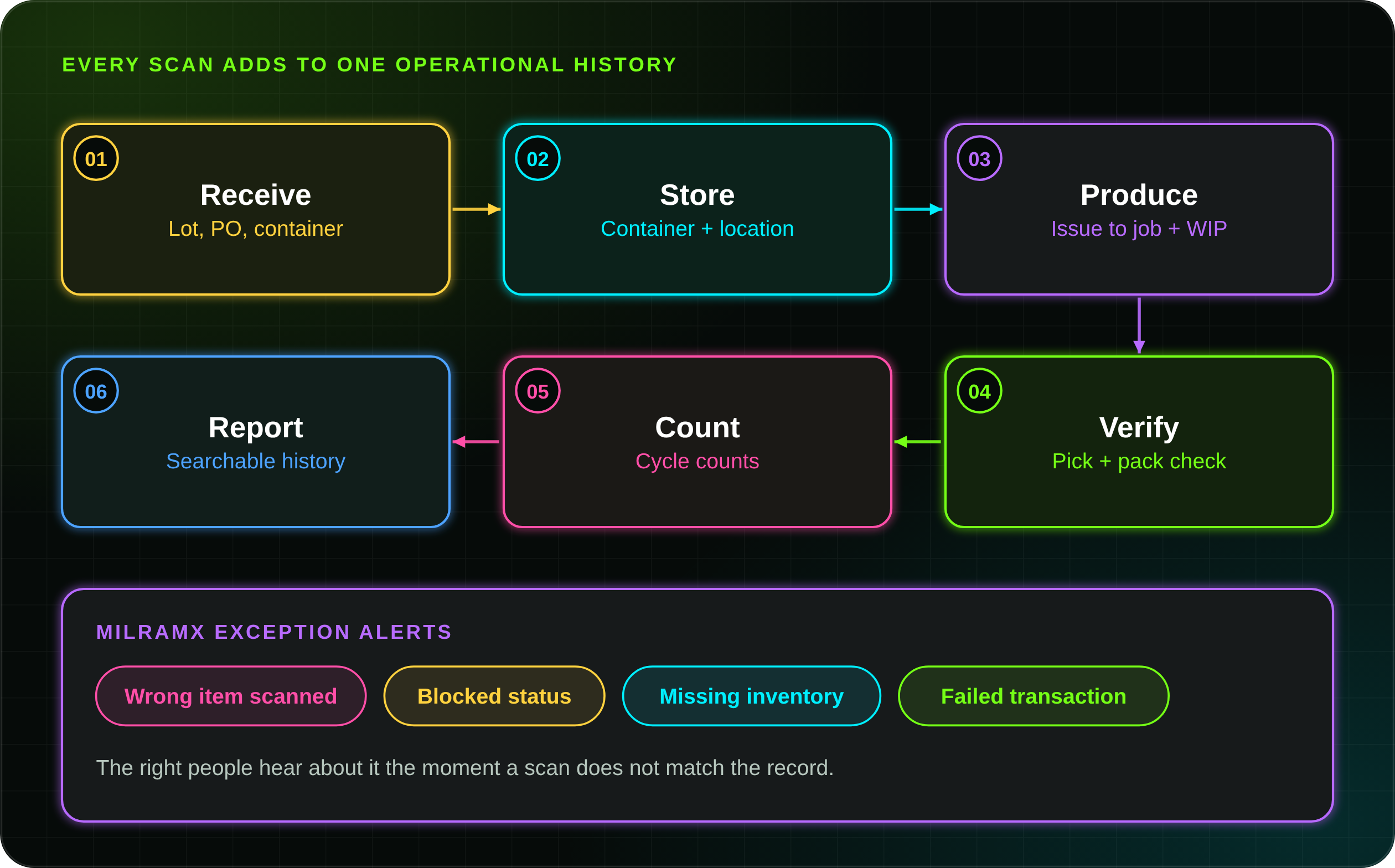
Receive
Capture supplier, PO, item, quantity, lot, serial, expiration date, container ID, and initial quality status before material goes into storage.
Store
Scan a container and a location to record putaway, transfers, staging, quarantine, cold storage, production issue, or return to stock.
Produce
Scan components, jobs, work centers, employees, tools, scrap, rework, and finished output so managers see WIP status in real time.
Verify
Confirm the right item, lot, serial, container, quantity, and order before shipping to cut wrong picks, label mistakes, and service issues.
Count
Scan physical inventory by item, container, location, and lot so cycle counts are faster and results go straight into BellHawk.
Report
Review inventory movement, job history, shipments, quality checks, container relationships, user activity, and audit trails.
6 Barcode Tracking Software Capabilities for Inventory, WIP, Assets, and Shipments
KnarrTek helps companies use barcode identifiers across the full operation to reduce manual entry, improve inventory accuracy, build a better material history, and give teams faster access to reliable data.
Track stock by item, lot, container, quantity, and location.
See what is available, where it is, what container holds it, and whether it is staged, quarantined, consumed, packed, or shipped.
Identify tools, equipment, fixtures, and reusable assets.
Track assets across locations, jobs, departments, maintenance, calibration, and check-in or check-out workflows.
Connect jobs, materials, operators, and production steps.
Use scans to track WIP movement, material issue, operation completion, job status, scrap, rework, output, and labor.
Print labels when materials are received, converted, packed, or shipped.
Label raw materials, containers, pallets, WIP, finished goods, shipments, customer-owned materials, and lot or serial items.
Build a searchable history from receiving through shipping.
Support lot and serial traceability, material genealogy, order history, quality records, shipment history, and audit readiness.
Capture activity on the floor, dock, warehouse, or field.
Scan with handheld devices, tablets, shared stations, wearable scanners, and label printers that fit the workflow.
Track Containers Inside Containers Without Losing Visibility
BellHawk barcode tracking software keeps parent and child containers connected, so pallets, cases, boxes, totes, bags, reels, cartons, and serialized parts stay in one real-time record.
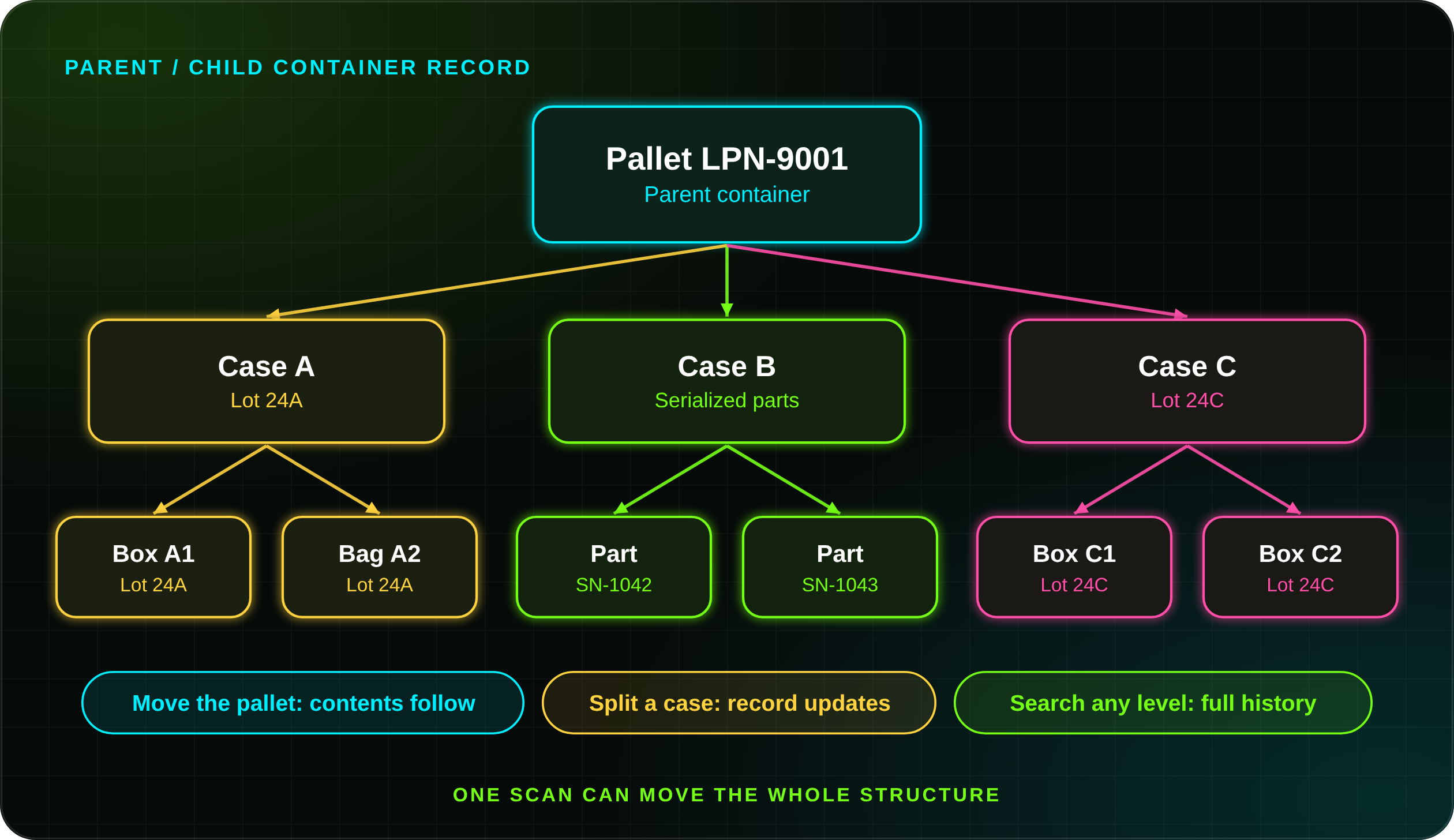
One scan moves the full structure.
When a parent pallet moves, BellHawk knows the child containers and materials inside it moved too.
Children are still tracked on their own.
If a case, tote, box, or bag is removed, split, consumed, returned, or shipped separately, the relationship updates.
History stays easy to search.
See what was inside a pallet, where it moved, which lot it belonged to, and how it was used or shipped.
Packed materials hide what is inside.
Without nested tracking, workers may only know the top-level pallet or shipment, which is a risk when you need the exact lot, serial number, order, or job inside.
Relationships follow real material movement.
A driver scans a pallet, a picker scans a carton, an operator scans a tote, and quality scans a lot label. BellHawk connects them so the record mirrors how materials are handled.
Warehouse, production, and shipping.
Useful for staging, packing, truck loading, transfers between sites, cold storage, and controlled areas in manufacturing, distribution, food, medical, aerospace, chemicals, and more.
LPN Tracking for Pallets, Totes, Bins, Cartons, and Shipments
LPN stands for License Plate Number. An LPN is a unique identifier assigned to a handling unit such as a pallet, tote, bin, carton, case, roll, reel, bundle, or shipment. The number identifies the container, and BellHawk stores the data behind it.
One scan can represent everything inside the container.
Workers scan the LPN instead of every item each time the container moves. BellHawk stores the contents, quantities, lots, serial numbers, customer order, location, quality status, and movement history behind it.
A pallet may hold several cartons, a tote may hold several jobs, and a kit may hold many components. The LPN gives each handling unit a single identity while BellHawk keeps the details.
Create or scan LPN labels on arrival so inbound containers are visible immediately.
Stage material kits, move WIP, track containers between operations, and issue materials to work orders.
Verify packing, shipment contents, truck loading, customer orders, and delivery documents.
Container identifiers can align with structured shipping identifiers such as SSCC labels when required.
Barcode Tracking Software for Manufacturers, Distributors, and Regulated Operations
KnarrTek supports barcode tracking software projects across the United States, including New England, the Mid-Atlantic, the Southeast, the Midwest, and other industrial regions. The same foundation serves small production teams, growing warehouses, multi-site distributors, and complex manufacturing plants.
Raw materials, WIP, jobs, operators, work centers, components, scrap, rework, finished goods, and production history.
Receiving, putaway, replenishment, picking, packing, shipping, LPN tracking, and inventory accuracy.
Lots, ingredients, batches, expiration dates, recipes, labels, traceability, and shipment records.
Components, devices, serial numbers, labels, quality records, inventory movement, and audit history.
Controlled materials, serialized parts, job records, traceability, inspection activity, and chain of custody.
Drums, totes, batches, lots, labels, containers, usage, quality checks, and regulated material movement.
Pallets, bundles, yard inventory, customer jobs, deliveries, tools, and jobsite material movement.
Rolls, sheets, labels, cartons, customer orders, WIP, scrap, finished goods, and shipment verification.
Turn Barcode Scans into Validated Data for ERP, Accounting, and Reporting
Barcode tracking software is most valuable when scan data is used beyond the handheld. MilramX exchanges validated operational data between BellHawk and the business systems your company already uses.
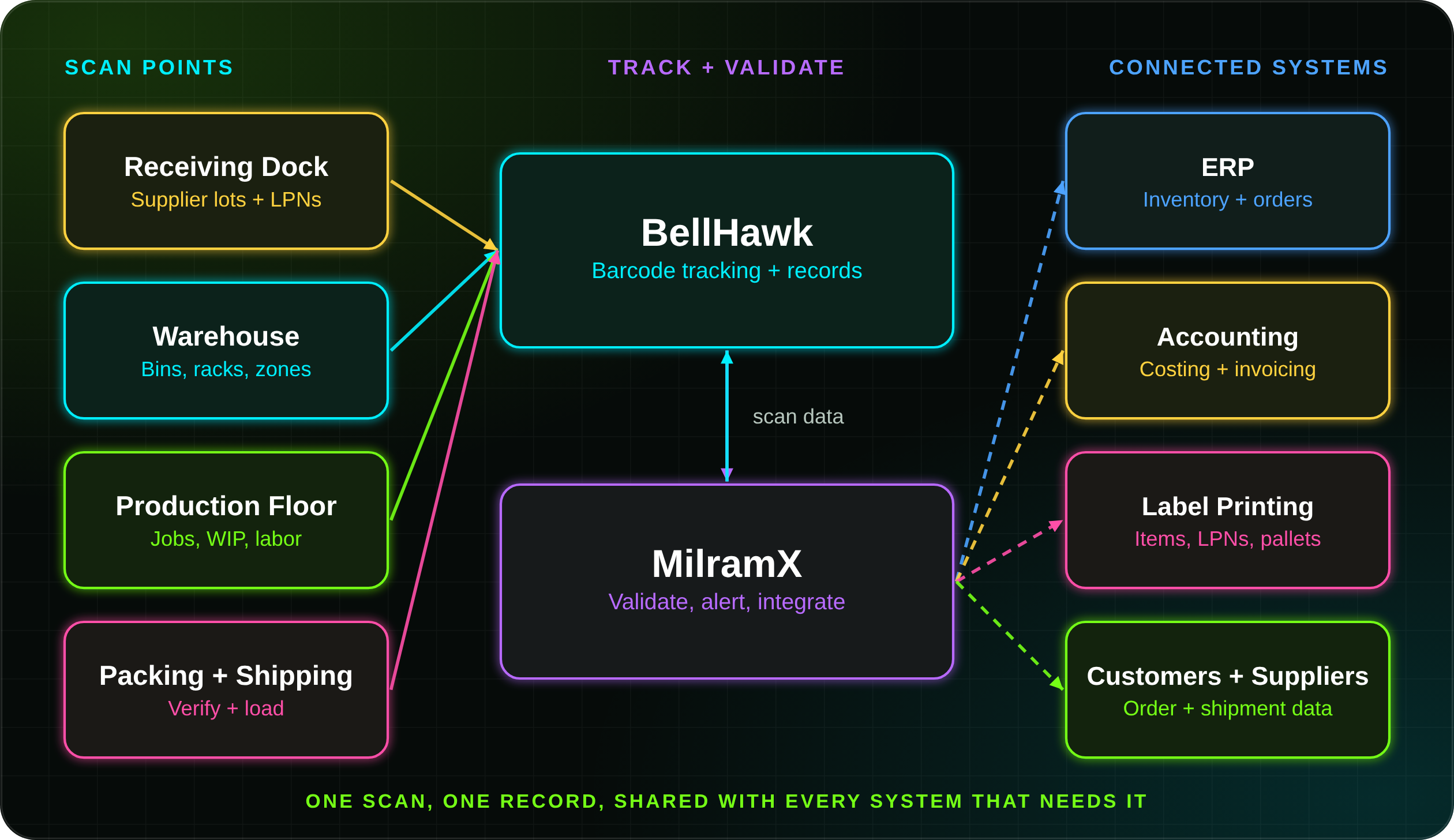
Share receiving, inventory, production, shipment, job, and material movement updates with ERP systems.
Trigger labels for inventory, containers, pallets, WIP, finished goods, customer orders, and shipments.
Capture barcode scanner, RFID reader, scale, workstation, and mobile device data in one workflow.
Notify the right people when a scan shows missing inventory, wrong material, blocked status, or a failed transaction.
Build Barcode Tracking Around the Workflow Your Team Already Performs
A barcode project should not start with labels. It should start with the questions your team needs answered: what needs an identity, which events get scanned, which locations matter, which containers move together, and which records update the ERP.
KnarrTek maps the physical workflow first, so receiving is fast, putaway is simple, production issue is clear, cycle counts are reliable, and shipping verification reduces errors.
Decide what needs a barcode: items, containers, locations, lots, serials, assets, tools, jobs, pallets, or shipments.
Define the scan events: receive, move, count, issue, consume, inspect, pack, ship, return, scrap, or rework.
Map the data behind each scan: item, quantity, status, location, user, time, job, customer, order, or quality result.
Decide where LPN and nested container tracking can cut repeated scans while keeping traceability.
Connect validated scan data to ERP, accounting, reporting, label printing, and customer or supplier workflows.
White Papers on Barcode Tracking, RFID, Inventory Errors, and Traceability
Use these KnarrTek resources for internal planning, to compare barcode and RFID tracking, understand traceability, reduce inventory errors, and improve real-time visibility.
Barcodes vs RFID for WIP Tracking
Compare barcode and RFID tracking for production, WIP visibility, and material movement.
Open PDF Inventory AccuracyPreventing Inventory Errors
How better scanning, labeling, and tracking reduce wrong counts and missing materials.
Open PDF TraceabilityInventory Tracking vs. Materials Traceability
How inventory visibility differs from a full material history from receiving to shipment.
Open PDF Inventory ControlTaking Inventory
Better ways to count, verify, and control inventory with connected tracking.
Open PDFRFID Tracking Software
Contactless reads for pallets, assets, containers, and high-volume movement.
View RFID Tracking Related SoftwareBellHawk Online
Browser-based inventory, production, and barcode tracking without a large IT project.
View BellHawk Online Related SoftwareWMS Inventory and Asset Tracking
Receiving, putaway, locations, transfers, picking, and shipping visibility.
View WMS TrackingReady to Connect Barcode Identifiers with Real-Time Operational Data?
BellHawk and MilramX barcode tracking software helps teams track inventory, materials, WIP, jobs, assets, LPNs, nested containers, labels, lots, serial numbers, quality checks, and shipments.
- Barcode tracking software
- LPN tracking
- Nested containers
- WIP barcode tracking
- ERP-connected data
Frequently Asked Questions About Barcode Tracking Software
Answers for teams comparing barcode tracking software, inventory barcode systems, LPN and nested container tracking, WIP barcode tracking, ERP integration, label printing, and lot traceability.
What is barcode tracking software?
Barcode tracking software uses scannable identifiers to connect physical items, containers, locations, assets, work orders, lots, serial numbers, and shipments to digital records. BellHawk uses barcode scans to capture receiving, movement, inventory counts, production issue, WIP tracking, quality checks, packing, and shipping as the work happens.
Do barcodes store all the data?
Not usually. In most tracking systems the barcode holds or represents an identifier. BellHawk uses that identifier to find the correct record in its database, which stores the details behind it, including item data, lot history, location, status, quantity, quality results, job usage, and shipment history.
What can be tracked with barcode tracking software?
Almost anything that moves or needs a history. Barcode tracking software can identify raw materials, purchased components, WIP, finished goods, containers, pallets, totes, LPNs, bins and storage locations, tools, fixtures, equipment, work orders, employees, customer-owned materials, and shipments. Each identifier links to a live BellHawk record, so one scan can show what the object is, where it is, and what has happened to it.
How does barcode tracking software improve inventory accuracy?
It reduces manual entry, ties every transaction to a specific item and container, and captures movement in real time. Instead of writing down moves or updating spreadsheets later, workers scan materials as they receive, store, issue, count, pick, pack, and ship them.
How does barcode tracking reduce picking and shipping errors?
Before an order is staged or loaded, workers scan the item, lot, serial number, quantity, container, and order. BellHawk checks each scan against the record, so a wrong part, wrong lot, or short quantity is flagged at the point of work instead of being found by the customer. MilramX can also alert the right people when a scan shows a blocked status or a failed transaction.
Can barcode tracking help with cycle counts and physical inventory?
Yes. Teams scan inventory by location, container, and lot and capture the counts directly in BellHawk instead of working from paper lists. Because each count is tied to a specific identifier and location, differences are easier to find and adjust, and counts can be done one area at a time as part of a regular cycle counting routine.
What is LPN tracking?
LPN tracking uses a License Plate Number to identify a handling unit such as a pallet, tote, bin, carton, case, roll, reel, or shipping container. The LPN barcode identifies the container, while BellHawk stores the contents and movement history behind that LPN.
What is nested container tracking?
Nested container tracking lets one container hold other containers. A pallet can hold cases, cases can hold boxes, and boxes can hold serialized parts. BellHawk maintains these parent-child relationships so teams know what is inside each container and how those contents move.
Can BellHawk track barcode labels for WIP?
Yes. BellHawk can use barcode labels to track work orders, WIP materials, production steps, employees, work centers, containers, tools, scrap, rework, and finished output. This connects material usage with job progress and production history.
Can barcode scans capture labor and job time?
Yes. Operators can scan their badge, the job, the work center, and the operation as they start and finish work. BellHawk connects that labor activity with material usage, scrap, rework, and output, which gives supervisors real-time WIP status and supports planned-versus-actual job reporting.
Can barcode tracking support lot and serial traceability?
Yes. Barcode tracking can support lot-controlled and serialized materials by connecting scans to lot numbers, serial numbers, receiving records, production usage, quality checks, shipment history, and customer orders.
What is the difference between inventory tracking and materials traceability?
Inventory tracking tells you what you have and where it is right now. Materials traceability keeps the full history: which supplier lot was received, which jobs consumed it, which finished goods it became, and which customers received those shipments. Barcode tracking software supports both, and the KnarrTek white paper Inventory Tracking vs. Materials Traceability explains the difference in more detail.
Can barcode tracking software handle customer-owned or consigned materials?
Yes. BellHawk records can store ownership along with item, lot, and location data, so customer-owned or consigned materials can be labeled, stored, issued, and reported separately from company stock. This helps teams avoid using the wrong material and answer customer questions about their inventory.
Can barcode tracking software connect with ERP systems?
Yes. MilramX can help exchange validated BellHawk barcode tracking data with ERP, accounting, QuickBooks Enterprise, customer systems, supplier systems, reporting tools, label systems, and other operational platforms.
Should we use barcode or RFID tracking?
Many operations use both. Barcode scanning gives precise, operator-confirmed identification of a specific item, container, or location. RFID can capture contactless reads for high-volume movement, pallets, and assets. KnarrTek supports barcode and RFID tracking and can combine them in one workflow.
Can barcode tracking work alongside RFID readers, scales, and other devices?
Yes. KnarrTek workflows can combine barcode scanners with RFID readers, scales, shared workstations, label printers, tablets, and mobile devices. MilramX can bring that device data into one workflow, so a weight from a scale or an RFID read at a dock door is stored with the same records your barcode scans update.
Can barcode tracking support SSCC shipping labels?
For logistics workflows, container identifiers such as LPNs can align with structured shipping identifiers like SSCC labels when a customer or carrier requires them. Label requirements are reviewed during solution design.
Which industries use KnarrTek barcode tracking software?
KnarrTek supports barcode tracking for manufacturing, industrial distribution, food and beverage, medical supplies and devices, aerospace and defense, chemicals, construction materials, and packaging operations across the United States.
How does a barcode tracking project start?
It starts with the workflow, not the labels. KnarrTek helps you decide what needs a barcode, which events should be scanned, what data each scan should capture, where LPN and nested container tracking can cut repeated scans, and which records should update your ERP and other systems.
Can we start with one workflow and expand later?
Yes. Many teams start with one focused workflow, such as receiving, putaway, or shipping verification, and prove the results before adding WIP tracking, LPN and nested container tracking, label printing, and ERP integration. The barcode identifiers and records you set up first stay in place as the system grows.
